




The average contractor thinks they’re making 35-40% profit margins. The reality, once actual labor and material costs are tracked, is closer to 15-22%. According to a 2023 construction industry survey, 63% of contractors cannot accurately state their profit margin on completed jobs because they lack systematic job costing.
Job costing calculates the true profitability of every job by tracking three components: what the customer paid, what labor actually cost, and what materials and expenses consumed. The formula is simple—Total Revenue minus Labor Costs minus Expenses equals Actual Profit—but most contractors run it manually (if at all) using spreadsheets that stay outdated the moment they’re created.
QuoteIQ’s Job Costing feature automates this calculation in real-time. Available on all plans (Beginner, Pro, and Elite), it pulls time tracking data directly from employee clock-ins and combines it with logged expenses to show profit margins the moment a job completes—no spreadsheets, no manual calculation, no guessing.
This guide covers why job costing matters, how to implement it, and how QuoteIQ’s automated approach works for home service businesses.
What Is Job Costing?
Job costing is an accounting method that tracks all costs associated with a specific job or project, then compares those costs against revenue to determine profitability.
For contractors and home service businesses, job costing answers the question: “Did I actually make money on this job?”
The Job Costing Formula
Profit = Total Revenue − Labor Costs − Material/Expense Costs
Profit Margin = (Profit ÷ Total Revenue) × 100
Example calculation:
| Component | Amount |
|---|---|
| Customer Payment (Revenue) | $1,500 |
| Labor (3 techs × 4 hours × $25/hour) | $300 |
| Materials | $180 |
| Equipment Rental | $75 |
| Total Costs | $555 |
| Profit | $945 |
| Profit Margin | 63% |
Without job costing, that $1,500 job “felt” profitable. With job costing, you know it generated $945 in actual profit at a 63% margin.
What Job Costing Tracks
Direct Labor Costs:
- Employee hours worked on the job
- Hourly wage rates per employee
- Overtime premiums (if applicable)
- Travel time to/from job site
Material Costs:
- Supplies consumed on the job
- Parts installed
- Consumables (chemicals, fasteners, etc.)
Other Direct Costs:
- Subcontractor fees
- Equipment rental
- Permit fees
- Disposal fees
- Job-specific insurance
What Job Costing Does NOT Track (Typically):
- Overhead (rent, utilities, office staff)
- Marketing costs
- Vehicle depreciation
- General insurance
Job costing focuses on direct costs attributable to specific jobs. Overhead allocation uses different accounting methods.
Why Contractors Need Job Costing
Problem 1: Pricing Based on Gut Feel
Most contractors price jobs based on experience and intuition. “A job like this usually takes about 4 hours, materials run maybe $200, so I’ll quote $800.”
That works until it doesn’t. Without tracking actual costs, you never know if your “gut feel” pricing consistently generates profit or slowly bleeds money.
The data:
- 47% of contractors admit to underpricing at least 20% of their jobs
- Underpriced jobs typically lose 15-30% when actual costs are calculated
- Contractors using job costing report 18-25% improvement in pricing accuracy within 6 months
Problem 2: Hidden Labor Cost Overruns
Labor is typically 40-60% of job cost for service businesses. Small overruns compound fast.
Example:
- Quoted job assuming 4 hours of labor
- Actual job took 5.5 hours
- At $30/hour labor cost, that’s $45 additional cost
- On a $600 job, profit dropped from $200 (33% margin) to $155 (26% margin)
Multiply that across 200 jobs per year. If 30% run over by similar amounts, you’ve lost $2,700 in expected profit—from a single recurring estimation error.
Without job costing, you’d never identify the pattern.
Problem 3: Material Cost Creep
Material prices fluctuate. Suppliers change. Waste happens. The $180 in materials you estimated becomes $220 on the actual job.
Job costing catches these variances so you can:
- Adjust pricing to reflect current material costs
- Identify suppliers with better pricing
- Train crews on material efficiency
- Update estimates with accurate quantities
Problem 4: Unprofitable Service Lines
Some services make money. Some don’t. Without job costing, you can’t tell which is which.
Real example pattern:
- Pressure washing driveways: 68% average margin
- Pressure washing house exteriors: 71% average margin
- Pressure washing commercial buildings: 31% average margin
That commercial work “felt” like good revenue—big invoices, steady contracts. Job costing revealed it barely covered costs after factoring crew travel time and equipment wear.
The contractor reduced commercial focus and increased residential marketing. Annual profit increased 23% with the same revenue.
Problem 5: Crew Efficiency Variance
Different crews produce different results. Without tracking labor per job per crew, you can’t identify:
- Which crews consistently hit time estimates
- Which crews regularly run over
- Training opportunities
- Performance-based compensation data
Job costing provides the data foundation for operational improvement.
How to Implement Job Costing
Step 1: Track Employee Hourly Rates
Every employee needs an hourly rate on file—what they actually cost you, not just their wage.
True hourly cost includes:
- Base wage
- Payroll taxes (employer portion)
- Benefits (health insurance, retirement contributions)
- Workers’ comp insurance
Calculation:
If an employee earns $20/hour base wage:
- Payroll taxes (7.65% employer FICA): $1.53
- Workers’ comp (varies, assume 5%): $1.00
- Benefits (varies widely): $2-5
- True hourly cost: $24.53-$27.53
Use true hourly cost in job costing for accurate profit calculation.
Step 2: Track Time Per Job
Labor costs require knowing hours worked per job. Methods include:
Manual time sheets: Employees log start/end times per job. Cheap but error-prone and often incomplete.
Digital time tracking: Employees clock in/out per job via mobile app. More accurate, creates automatic records.
GPS-verified time tracking: Clock-in only works at job location. Prevents time inflation and verifies presence.
QuoteIQ uses GPS-verified time tracking through EmployeeHub. Employees clock into specific jobs, and hours automatically calculate with their stored hourly rate.
Step 3: Track Materials and Expenses
Every cost attributable to a specific job needs logging:
At time of purchase:
- Materials bought for specific job
- Equipment rentals
- Subcontractor invoices
From inventory:
- Parts pulled from truck stock
- Supplies consumed on job
After completion:
- Disposal fees
- Additional charges
The more granular your expense tracking, the more accurate your job costing.
Step 4: Calculate Per-Job Profitability
With revenue, labor, and expenses tracked, the calculation is straightforward:
Revenue (what customer paid) − Labor (hours × hourly rate for each employee) − Materials (all supplies and parts) − Other expenses (rentals, subcontractors, fees) = Profit
Profit ÷ Revenue × 100 = Profit Margin %
Step 5: Analyze Patterns
Individual job profitability matters less than patterns across jobs:
- Average margin by service type
- Average margin by crew
- Average margin by customer type (residential vs. commercial)
- Variance between estimated and actual costs
- Trends over time (improving or declining?)
These patterns drive business decisions: pricing changes, service mix adjustments, crew training, operational improvements.
QuoteIQ Job Costing: How It Works
QuoteIQ automates the job costing process by connecting data that already exists in the system: job pricing, employee time tracking, and expense logging.
Automatic Labor Cost Calculation
When you add employees to QuoteIQ through EmployeeHub, each employee profile includes their hourly rate.
When employees clock in and out of jobs using the QuoteIQ mobile app, the system automatically calculates:
Hours worked × Hourly rate = Labor cost for that employee on that job
Multiple employees on the same job? Each one’s labor cost calculates separately and totals automatically.
No manual entry. No spreadsheets. No forgetting to log hours two weeks later.
Real-Time Profit Visibility
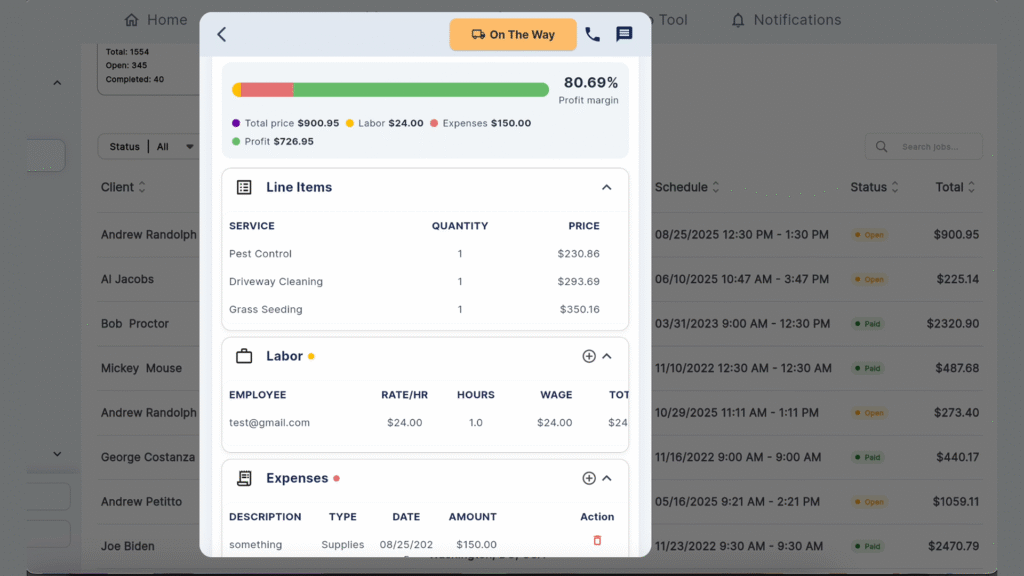
Open any scheduled or completed job in QuoteIQ. Navigate to the Report tab.
You’ll see:
- Profit margin bar — Visual percentage display showing job profitability
- Total Price — What the customer paid
- Labor — Calculated from time tracking (expandable to see per-employee breakdown)
- Expenses — All logged costs for this job (expandable to see line items)
- Profit — Revenue minus all costs
This updates in real-time. As employees clock hours and expenses get logged, the profit calculation adjusts.
Expense Tracking Per Job
Within each job, log expenses as they occur:
- Materials purchased
- Parts from inventory
- Subcontractor fees
- Equipment rental
- Disposal costs
- Any other job-attributable expense
Each expense entry includes description, amount, and category. All expenses roll into the job cost calculation automatically.
Line Item Visibility
Expand the Line Items section to see the service breakdown from the original estimate. Useful for comparing quoted services against actual costs incurred.
Expand the Labor section to see:
- Each employee who clocked time to this job
- Hours worked per employee
- Calculated labor cost per employee
- Total labor cost
Expand the Expenses section to see every logged expense with descriptions and amounts.
Integration with Time Tracking
Job costing in QuoteIQ only works as well as your time tracking.
The system requires:
- Employee profiles with hourly rates set
- Employees clocking in/out of specific jobs (not just general clock-in)
- Consistent use across your team
When employees clock into “Job #1847 – Johnson Residence” instead of just “clocking in for the day,” QuoteIQ attributes those hours to that specific job for costing purposes.
What QuoteIQ Job Costing Shows You
Per-job insights:
- Did this specific job make money?
- What was the actual profit margin?
- Where did costs come from (labor vs. materials)?
- Did the job run over on labor hours?
Pattern insights (across many jobs):
- Which services generate the highest margins?
- Which crews are most efficient?
- Are margins trending up or down over time?
- Which jobs consistently underperform estimates?
Plan Availability
Job Costing is available on all QuoteIQ plans: Beginner ($29.99/month), Pro ($98.99/month), and Elite ($188/month).
This was the #1 most-requested feature from QuoteIQ users. Making it available on all plans—including Beginner—ensures every contractor can access real profitability data regardless of business size.
Job Costing Best Practices
1. Set Accurate Hourly Rates
Don’t use base wages. Calculate true hourly cost including taxes, insurance, and benefits. Underestimating hourly rates makes every job appear more profitable than reality.
2. Enforce Consistent Time Tracking
Job costing fails if employees don’t clock into specific jobs. Make per-job clock-in mandatory. Review compliance weekly until it becomes habit.
3. Log Expenses Immediately
Expenses logged “later” often don’t get logged at all. Train crews to log materials and expenses before leaving the job site. Mobile app access makes this possible.
4. Review Job Profitability Weekly
Don’t wait for monthly accounting. Review completed jobs weekly:
- Any jobs with margins below target?
- Any patterns emerging?
- Any pricing adjustments needed?
5. Set Margin Targets by Service Type
Different services have different natural margins. Set targets:
- Maintenance services: 50-60% margin target
- Installation projects: 35-45% margin target
- Emergency/rush work: 60-70% margin target
Compare actual results against targets to identify underperformers.
6. Investigate Outliers
Jobs significantly above or below target margins deserve investigation:
- High margin: What went right? Can it be replicated?
- Low margin: What went wrong? Was it estimation, execution, or scope creep?
7. Update Estimates Based on Actuals
Job costing creates feedback loops. When actual costs consistently exceed estimates:
- Raise prices
- Adjust time estimates
- Identify efficiency improvements
- Train crews on specific issues
8. Share Data with Crews (Carefully)
Some contractors share job profitability with crews to build cost awareness. Others keep it confidential. Both approaches work—but if sharing, focus on trends and targets rather than exact profit figures.
Common Job Costing Mistakes
Mistake 1: Forgetting Travel Time
If your crew spends 45 minutes driving to a job, that’s labor cost. Job costing should include travel time, or profits appear higher than reality.
Solution: Clock in when leaving for the job, not when arriving. Or add estimated travel time to job labor budgets.
Mistake 2: Ignoring Small Expenses
The $12 in fasteners. The $8 roll of tape. The $15 in disposal fees. Small expenses add up. A job with 10 ignored small expenses might have $100+ in untracked costs.
Solution: Log everything. Mobile expense logging makes small items easy to capture.
Mistake 3: Using Outdated Hourly Rates
Employee costs change. Wages increase. Insurance rates adjust. If your hourly rates in the system are 18 months old, job costing calculations are wrong.
Solution: Review and update hourly rates quarterly.
Mistake 4: Not Tracking Warranty/Callback Costs
The job looked profitable until you went back twice to fix issues. Warranty labor and materials should attach to the original job’s cost.
Solution: Log callbacks and warranty work against the original job, not as separate entries.
Mistake 5: Analyzing Individual Jobs Instead of Patterns
One unprofitable job means nothing. Ten unprofitable jobs in the same service category means everything.
Solution: Focus on trends across jobs, not individual anomalies.
FAQ: Job Costing for Contractors
Q: What is job costing in construction and field service?
A: Job costing is an accounting method that tracks all costs (labor, materials, expenses) for each specific job, then compares those costs against revenue to calculate actual profit. It answers “how much money did I really make on this job?” rather than relying on estimates or averages.
Q: How do you calculate job cost for a service business?
A: Job cost = Labor costs + Material costs + Other direct expenses. Labor costs = hours worked × hourly rate for each employee. Calculate profit by subtracting total job cost from customer payment. Profit margin = (Profit ÷ Revenue) × 100.
Q: What is a good profit margin for contractors?
A: Target profit margins vary by service type. General guidelines: maintenance services (50-65%), installation projects (35-50%), emergency/rush services (55-70%). The average contractor operates at 15-25% actual margin, though many believe they’re achieving 35-40%. Accurate job costing typically reveals lower real margins than expected.
Q: How do you track labor costs per job?
A: Require employees to clock in/out of specific jobs (not just daily clock-in). Multiply hours worked by each employee’s true hourly cost (wage + taxes + insurance + benefits). Software like QuoteIQ automates this calculation when employees have hourly rates stored and clock into jobs through the mobile app.
Q: What’s the difference between job costing and process costing?
A: Job costing tracks costs per individual project/job—ideal for contractors where each job is unique. Process costing tracks costs per production process or time period—used in manufacturing with identical units. Field service businesses use job costing because every job has different labor requirements, materials, and conditions.
Q: Does QuoteIQ have job costing?
A: Yes. QuoteIQ Job Costing is available on all plans (Beginner, Pro, Elite). It automatically calculates labor costs from employee time tracking, combines with logged expenses, and displays real-time profit margin for every job. No spreadsheets or manual calculation required.
Q: How do you track job costs without software?
A: Manual job costing requires: (1) time sheets per job per employee, (2) material receipts sorted by job, (3) spreadsheet calculations combining all costs, (4) comparison against invoiced amount. This process typically takes 15-30 minutes per job and often falls behind or gets abandoned. Software automates the entire process.
Q: What expenses should be included in job costing?
A: Include all direct costs attributable to the specific job: employee labor (including travel time), materials consumed, parts installed, equipment rental, subcontractor fees, permit costs, disposal fees, and job-specific supplies. Exclude general overhead (rent, utilities, office staff, marketing) which applies across all jobs.
Q: How often should contractors review job profitability?
A: Weekly review of completed jobs is ideal. Monthly at minimum. Waiting for quarterly or annual accounting reviews means problems compound for months before identification. Quick weekly reviews (15-20 minutes) catch pricing issues, labor overruns, and margin erosion while they’re still correctable.
Q: Can job costing help with pricing decisions?
A: Yes—this is the primary business value. Job costing reveals: which services generate real profit, which services underperform, whether estimates align with actual costs, and how crew efficiency affects margins. This data directly informs pricing adjustments. Contractors using job costing report 18-25% improvement in pricing accuracy within 6 months.
Key Takeaways
- 63% of contractors cannot accurately state their profit margins because they lack systematic job costing
- The average contractor overestimates profit margins by 15-20 percentage points (thinking 35-40% when actually earning 15-22%)
- Job costing formula: Revenue − Labor − Materials − Expenses = Actual Profit
- True hourly labor cost = Base wage + payroll taxes + workers’ comp + benefits (typically 20-35% higher than base wage)
- QuoteIQ Job Costing automates the process by pulling time tracking data and expenses to calculate real-time profit per job
- Job Costing is available on all QuoteIQ plans including Beginner at $29.99/month
- Weekly profitability reviews catch margin erosion before it compounds into significant losses
- Contractors using job costing report 18-25% improvement in pricing accuracy within 6 months
Stop Guessing at Profitability
Every job you complete without tracking actual costs is a guess. Some guesses work out. Others quietly drain profit while appearing successful on the surface.
Job costing replaces guessing with knowing. Not “I think we made good money on that job”—but “that job generated $847 profit at 52% margin, labor ran 6% over estimate, materials came in 4% under.”
QuoteIQ makes that visibility automatic. Employees clock time. Expenses get logged. Profit calculates in real-time. No spreadsheets, no end-of-month reconciliation, no data entry hours.
The feature exists on all plans because every contractor—from solo operators to 50-person crews—deserves to know if they’re actually making money.
Ready to see real profit margins on your jobs? Start your 14-day free trial or schedule a demo to see Job Costing in action.






