



Visual pipeline CRM built for home service contractors. Track every opportunity from first lead to signed contract with custom stages, probability-weighted revenue forecasting, drag-and-drop Kanban boards, redesigned deal cards, multi-assignee support, deal attachments, and a 6-metric analytics dashboard — all inside QuoteIQ.
QuoteIQ Pipelines is the best contractor pipeline software in 2026 for home service businesses — a visual sales CRM with Kanban and list views, unlimited custom stages, probability-weighted revenue forecasting, multi-assignee deals, PDF/image attachments, and a 6-metric analytics dashboard. Pipelines is included natively on the Elite plan at $299/mo (7 users) and the Max plan at $699/mo (unlimited users) — no add-on fee, no per-seat pricing, and no separate CRM subscription required. QuoteIQ Pipelines is modeled on the proven Kanban-stage methodology used by leading sales CRMs like HubSpot and Pipedrive but priced and designed specifically for home service contractors and built into the same app as your estimates, scheduling, and team management.
TL;DR: QuoteIQ Pipelines gives contractors a full visual sales CRM — Kanban board, sortable list view, unlimited pipelines, custom stages with probability percentages, weighted revenue forecasting, and deep integration with your estimates, EmployeeHub, and customer database. Spring 2026 updates added multi-assignee deals, PDF/image attachments via Firebase Storage, tabbed deal previews (Summary and Work tabs), internal-only notes, redesigned deal cards with gradient backgrounds and priority accent bars, and date range filters with animated filter chips. Available on Elite ($299/mo) and Max ($699/mo). Read the independent review from Software Advice on modern pipeline CRMs and the data from BrightLocal on how organized sales processes correlate with higher close rates for local service businesses.
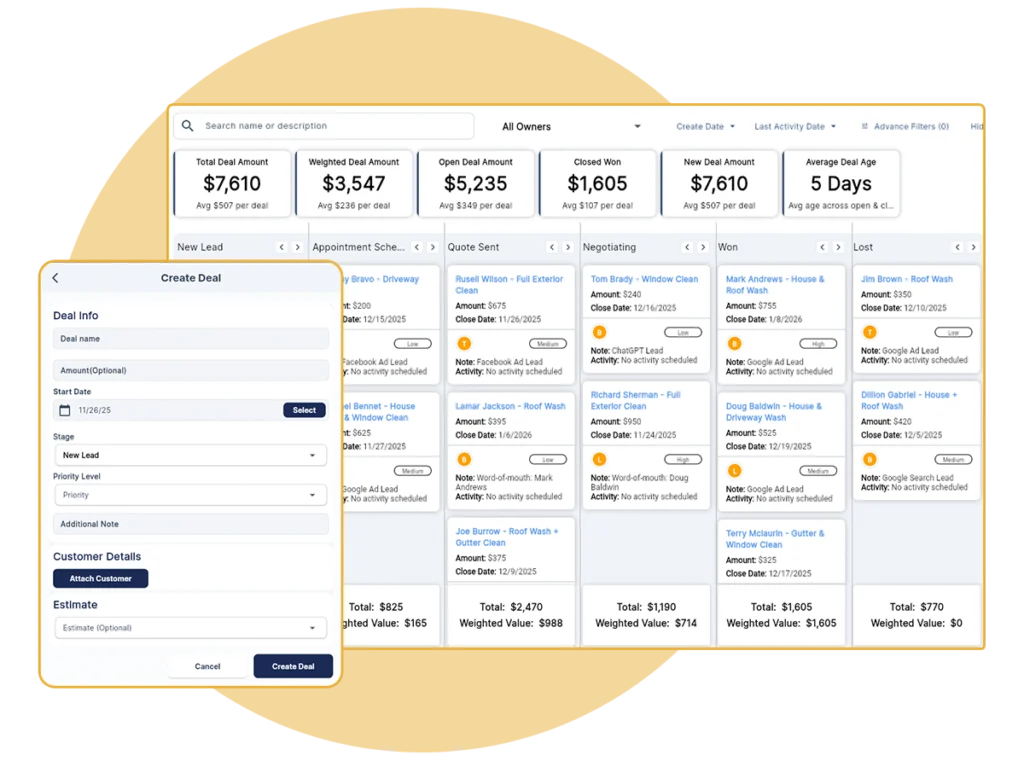
Build custom pipelines that match how your contracting business actually works. Create unlimited pipelines for different services, set your own stages with probability percentages, and configure everything to fit your real sales process. No templates to fight — just flexible contractor pipeline software that adapts to your trade, whether you run pressure washing, lawn care, HVAC, or painting.
Create unlimited stages that match your exact sales process from initial lead to closed job with drag-and-drop reordering.
Assign close percentages to each stage for realistic revenue forecasting based on proven CRM methodology.
Create separate pipelines for different services like pressure washing, painting, HVAC, or holiday lighting.
Modify pipeline stages, probabilities, and names whenever your process changes — without losing existing deal data.
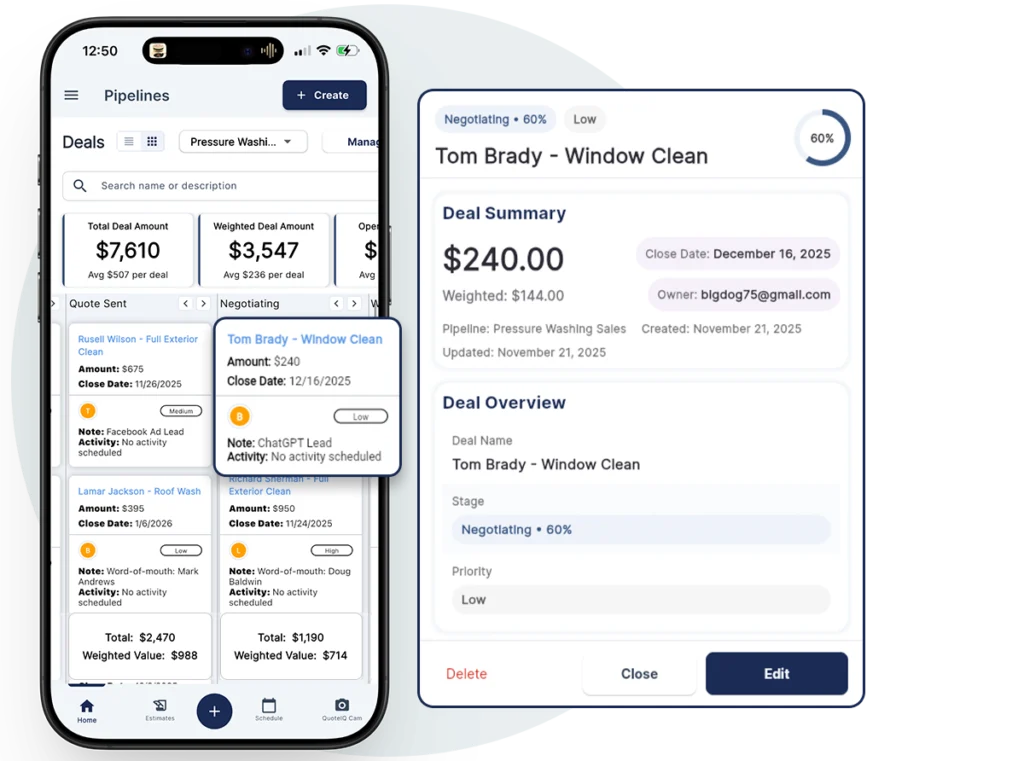
Track every opportunity from first contact to signed contract. Create deals in seconds, attach customer information and estimates, assign multiple team members, upload supporting PDFs and photos, and move deals through stages with simple drag-and-drop. The Spring 2026 update added a tabbed deal preview (Summary and Work tabs), a dedicated Internal Notes section for team-only context, and support for multi-assignee deals — so two or more team members can own an opportunity together.
Create new deals with name, amount, close date, priority, and notes in under 30 seconds from any device.
Assign deals to multiple team members simultaneously from a searchable dialog inside the deal preview.
Attach PDFs and images directly to deals — stored securely in Firebase and accessible from the deal detail view.
Dedicated notes field separate from customer-visible content for team context, follow-up reminders, or deal history.
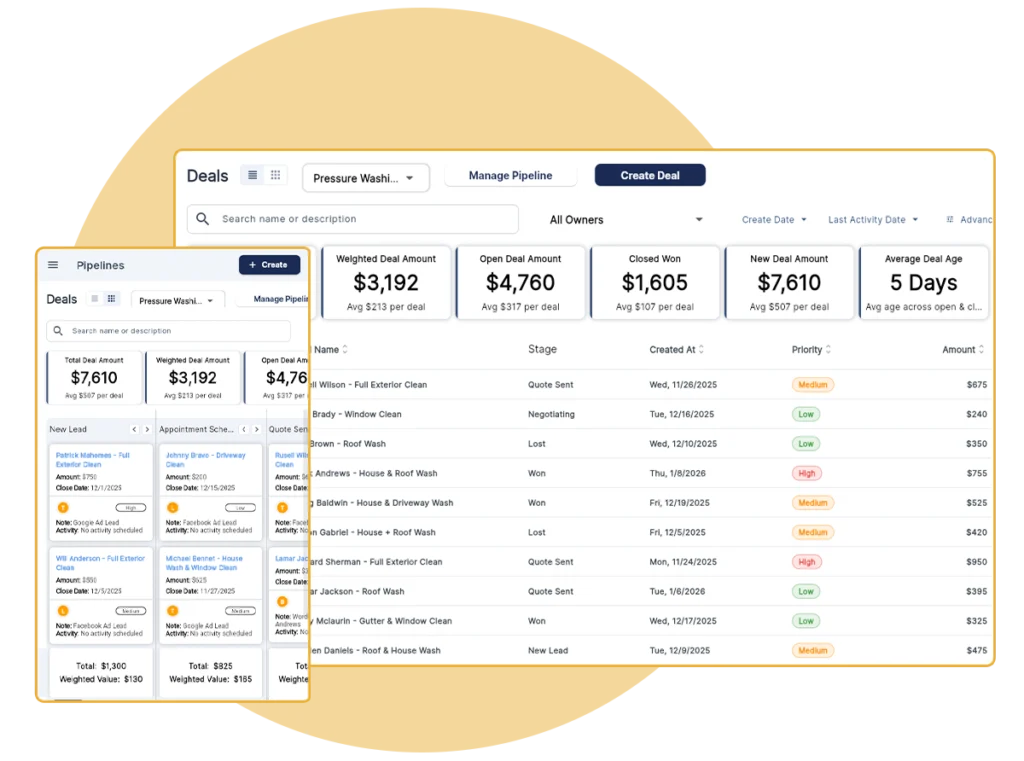
See your entire sales pipeline at a glance with QuoteIQ’s visual board and list views. The Spring 2026 Kanban redesign added gradient-background deal cards, a left accent bar showing priority, close-date chips, assignee avatars, and scroll-edge fade indicators so you can tell at a glance which deals are hot and which are drifting. Switch between board and list views instantly to analyze your pipeline however works best for your workflow.
Kanban columns display deals as cards organized by stage with drag-and-drop, stage totals, and weighted values.
Traditional table format shows all deal data in sortable columns for detailed analysis and quick scanning.
Gradient backgrounds, left priority accent bar, close-date chips, and assignee avatars on every deal card.
Optimized layouts for desktop, tablet, and mobile so your pipeline works wherever your crew works.
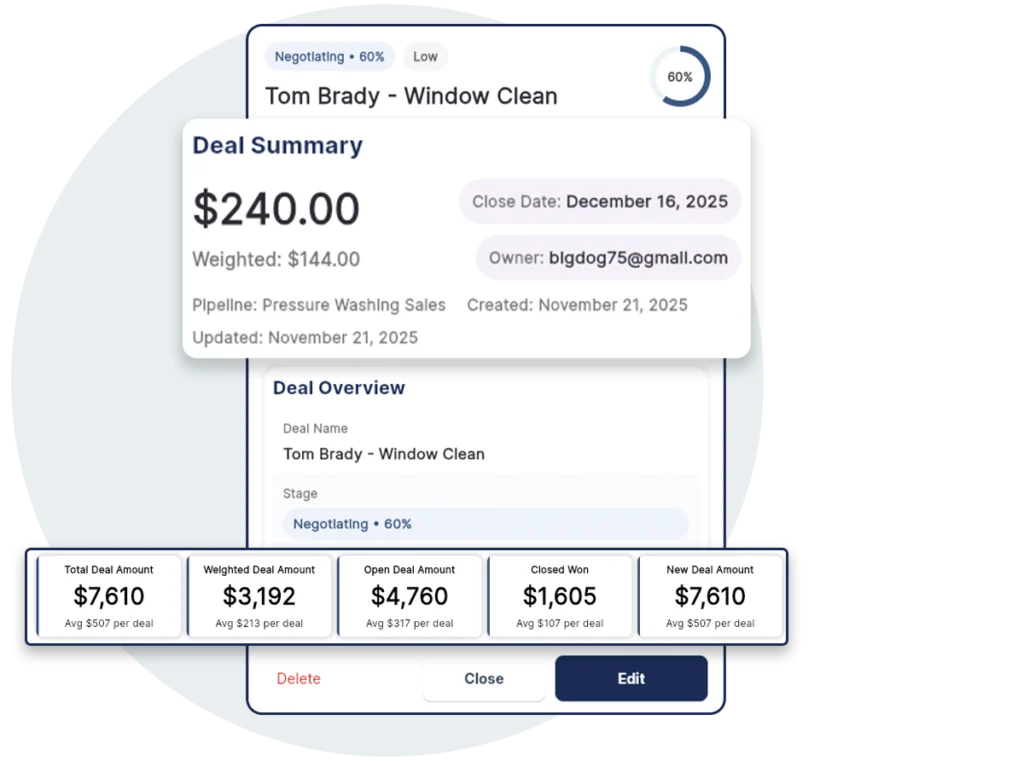
Make data-driven decisions with QuoteIQ’s built-in pipeline analytics dashboard. See total deal value, weighted forecasts, closed revenue, and average deal age at a glance. Probability-weighted calculations give you realistic revenue projections based on where deals sit in your pipeline — not just wishful thinking. Pair it with QuoteIQ Business Analytics and Job Costing for the complete picture of pipeline-to-profit performance.
View the combined value of all deals across every stage in your pipeline for complete opportunity visibility.
Realistic revenue projections calculated by multiplying deal amounts by their stage probability percentages.
Monitor completed deals that moved to Won status to track actual revenue generated through your pipeline.
See how long deals typically sit in your pipeline to identify bottlenecks and improve your close timeline.
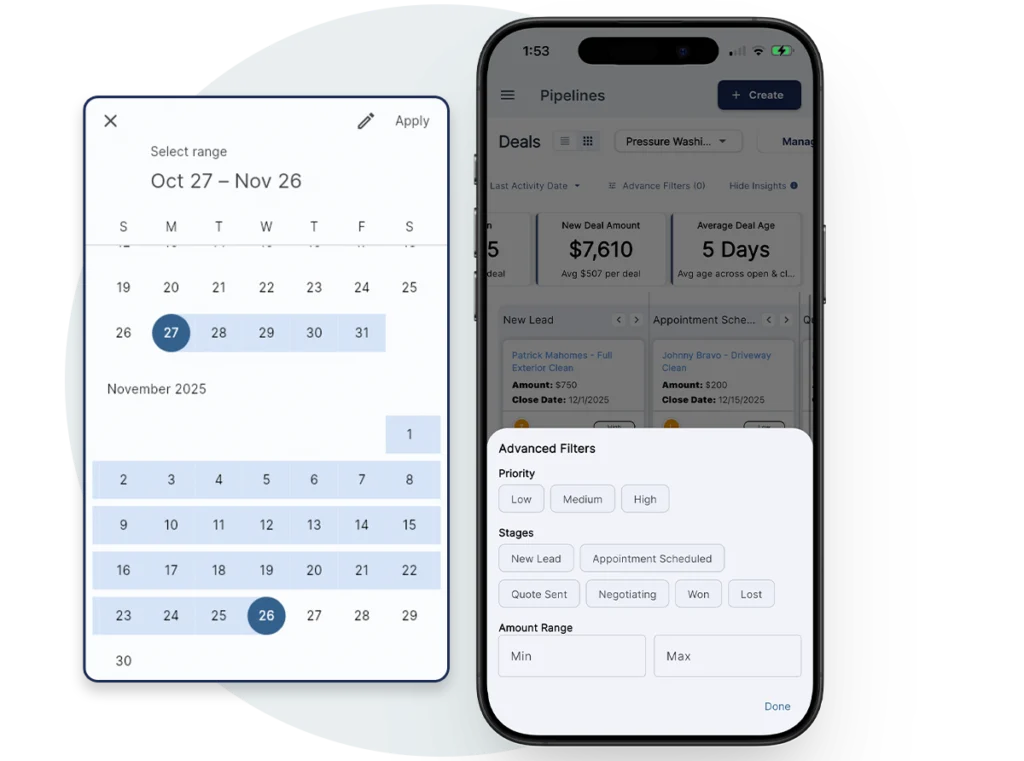
Find any deal instantly with QuoteIQ’s built-in search and advanced filtering. Search by deal name or notes, filter by the employee who owns the deal, narrow results by creation or last-activity date, and isolate deals by priority level. The Spring 2026 filter bar update added date preset popups and animated filter chips for faster pipeline filtering — zero in on exactly the opportunities that need your attention right now.
Find deals instantly by searching names and descriptions across your entire pipeline from one search bar.
Filter deals by assigned employee to see individual workloads and track accountability across your team.
Date preset popups and animated filter chips for faster pipeline filtering by creation or last-activity date.
Isolate High, Medium, or Low priority deals to focus on the opportunities that matter most right now.
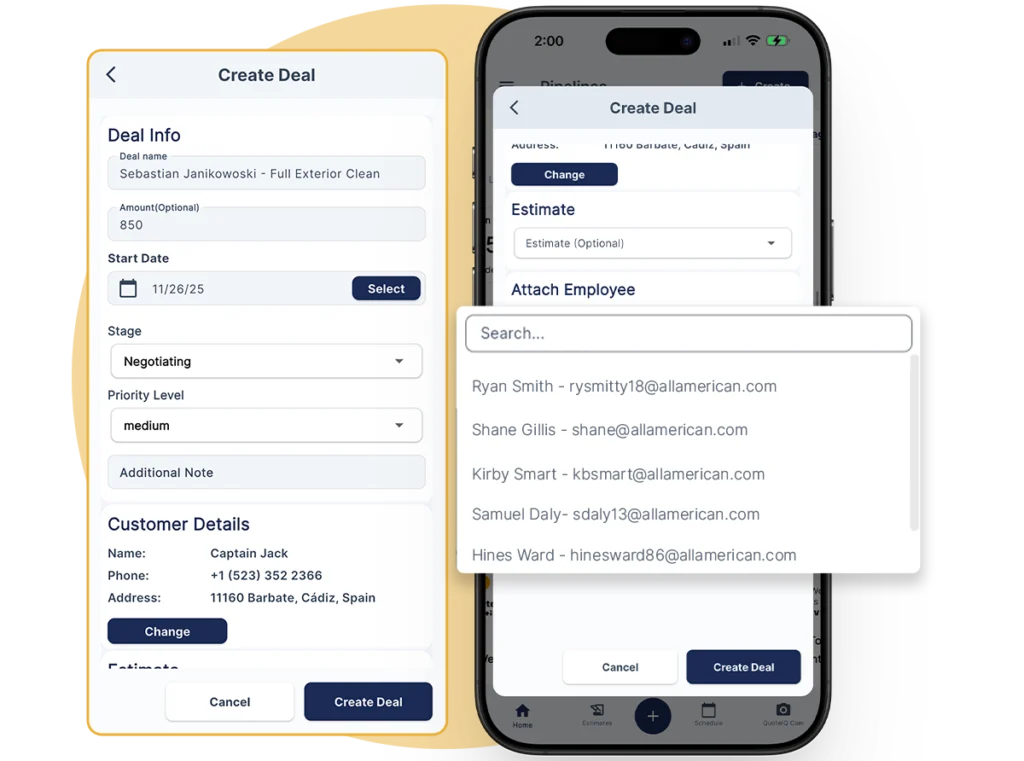
QuoteIQ Pipelines connects directly to your existing customer data, estimates, and team structure. Assign deals to specific employees (or multiple employees) for accountability. Link estimates to track which quotes are progressing. Everything works together with EmployeeHub, ClientHub, and AI Autopilot so your contractor pipeline software fits your actual workflow — not the other way around.
Assign deals to specific team members for clear ownership, accountability, and performance tracking.
Attach QuoteIQ estimates to deals so you can track exactly which quotes are progressing toward closed jobs.
Link pipeline deals to customers already in your CRM with full access to contact history and job records.
Each pipeline keeps deals completely separate so pressure washing leads never mix with painting opportunities.
Contractors told us they were losing jobs because opportunities fell through the cracks. Leads came in, quotes went out, but follow-up got buried in sticky notes and forgotten spreadsheets. We built Pipelines because home service businesses deserve real CRM functionality — not enterprise software priced for corporations. Track every opportunity, forecast revenue accurately, assign deals across your team, attach supporting documents, and stop losing jobs you should have won.
Stages are fully customizable. You define the process, name the stages, and set the probabilities. Contractors use Pipelines to track anything that moves through sequential steps — not just sales.
Track every sales opportunity from initial lead to signed contract. See exactly how much revenue is in your pipeline at every stage and which deals are closest to closing.
Organize incoming leads by source and qualification status. Track which leads have been contacted, which need follow-up, and which are ready for an estimate.
Monitor active jobs through stages from contract signed to completion. Assign crew members, track progress, and know where every project stands at a glance.
Build a pipeline for past customers who are due for repeat service. Track seasonal outreach, follow-up timing, and rebooking status for recurring revenue.
Track commercial or government contract bids through longer sales cycles. Manage RFP responses, site visits, bid submissions, and award decisions.
Manage referral relationships and partnership opportunities. Track conversations, proposals, and agreements with real estate agents, property managers, or other contractors.
A complete visual pipeline CRM needs more than a list of leads. Here’s what’s built into QuoteIQ Pipelines on Elite and Max — no add-on fees, no separate CRM subscription, no per-seat pricing.
Full drag-and-drop Kanban columns plus a sortable spreadsheet-style list view. Switch between them instantly. Redesigned deal cards with gradient backgrounds, priority accent bars, close-date chips, and assignee avatars.
Assign a close probability to each stage (e.g., Quote Sent = 50%, Negotiating = 75%). Deal amount × probability = realistic weighted revenue forecast, updated live across your entire pipeline.
Create separate pipelines for every service line. Each pipeline has its own custom stages with drag-and-drop reordering and adjustable probabilities. No template lock-in.
Assign deals to one person or a whole crew via a searchable dialog. Filter the pipeline by owner to see individual workloads. Clear accountability, flexible ownership.
Upload contracts, scope photos, site plans, and supporting documents directly to each deal. Stored securely in Firebase and accessible from the deal detail view on desktop or mobile.
Total Deal Amount, Weighted Deal Amount, Open Deal Amount, Closed Won, New Deal Amount, and Average Deal Age — updated in real time. Each board column also shows stage totals with weighted values.
Link deals to existing customer profiles and estimates. Assign EmployeeHub team members. Track communication via ClientHub. Everything connects out of the box — no Zapier required.
Search by deal name or notes. Filter by owner, date range, or priority (High/Medium/Low). Animated filter chips and date preset popups so you can zero in on exactly the opportunities that need attention.
Researching your options? See how QuoteIQ compares to other field service platforms on our Competitor Comparisons hub.
Pipelines is included on Elite and Max plans. No add-on. No per-seat pipeline fees. A credit or debit card is required to start your 14-day free trial.
You can go from zero to a fully working sales pipeline in under 10 minutes. A credit or debit card is required to start the 14-day free trial.
Choose Elite ($299/mo, 7 users) or Max ($699/mo, unlimited users). All plans include a 14-day free trial. Credit or debit card required to start.
Open the Deals icon in the sidebar, click “New Pipeline,” and name it. Add custom stages like New Lead, Quote Sent, Negotiating, Won, and Lost.
Assign a probability percentage to each stage (e.g., New Lead = 10%, Quote Sent = 50%, Negotiating = 75%). This powers weighted revenue forecasting.
Create deals, link customers and estimates, assign employees, attach PDFs, and move them through stages. Watch your analytics dashboard update in real time.
QuoteIQ Pipelines is the best contractor pipeline software in 2026 for home service businesses because it combines a visual Kanban board, sortable list view, unlimited custom pipelines, probability-weighted revenue forecasting, multi-assignee deals, PDF/image attachments, and a 6-metric analytics dashboard — all native inside a field service CRM built specifically for contractors. Pricing starts at $299/mo for Elite (7 users) and $699/mo for Max (unlimited users), with a 14-day free trial on all plans. A credit or debit card is required to start.
Unlike generic sales CRMs like HubSpot or Salesforce that require you to integrate with your field service software, QuoteIQ Pipelines lives in the same app as your estimates, invoices, scheduling, and EmployeeHub — so deals stay connected to the actual jobs they turn into.
Contractor pipeline CRM pricing ranges from $29 to $800+ per month depending on features and users. QuoteIQ Pipelines is included on the Elite plan at $299/mo (7 users) and the Max plan at $699/mo (unlimited users) — with no add-on fee, no per-seat pipeline charge, and full access to every pipeline feature. By comparison, standalone sales CRMs like Pipedrive or HubSpot charge per user per month on top of your existing field service subscription, and enterprise options like Salesforce can run $150+ per user.
QuoteIQ’s flat pricing on Elite means one $299/mo subscription covers your entire 7-person team’s pipeline access plus Inventory, Route Optimization, InstaQuote, and InstaSchedule. A credit or debit card is required to start the 14-day free trial.
QuoteIQ Pipelines is a visual CRM system for tracking deals through custom stages using a Kanban board or sortable list view. Each deal includes a name, amount, close date, priority, notes, linked customer, linked estimate, assigned employee(s), and attachments. The system calculates probability-weighted revenue forecasts based on which stage each deal is in — so you see realistic revenue projections, not just raw totals.
Spring 2026 updates added redesigned deal cards with gradient backgrounds and priority accent bars, multi-assignee support via a searchable dialog, PDF/image attachments stored in Firebase, a tabbed deal preview (Summary and Work tabs), internal-only notes separate from customer-visible content, and date range filters with animated filter chips.
Pipelines is included on the Elite plan ($299/mo, up to 7 users, 5,000 IQ Credits/mo) and the Max plan ($699/mo, unlimited users, 8,000 IQ Credits/mo). Pipelines is not available on Essentials, Beginner, or Pro plans. All QuoteIQ plans include a 14-day free trial — a credit or debit card is required to start.
Elite and Max also include EmployeeHub, Inventory Management, Route Optimization, InstaQuote, and InstaSchedule at no additional cost.
Basic lead tracking typically means tagging clients as “leads” in a CRM database, logging their source, and moving them to “customer” status once they book a job. It’s essentially a spreadsheet with labels. A full visual pipeline CRM like QuoteIQ Pipelines goes well beyond that — it treats every opportunity as a deal with its own amount, close date, priority, probability percentage, assigned owner(s), linked estimate, and attachments. Deals move through custom stages you define (New Lead → Quote Sent → Negotiating → Won) on a visual Kanban board with drag-and-drop.
The critical piece most contractors miss: probability-weighted revenue forecasting. A $10,000 deal in “Quote Sent” at 50% is worth $5,000 to your pipeline forecast. A $10,000 deal in “Negotiating” at 75% is worth $7,500. Summing every deal’s weighted value gives you a realistic revenue projection — not the inflated total you get from adding all deal amounts together. That’s what separates a real sales CRM from a client database.
Yes. Every QuoteIQ plan — Essentials, Beginner, Pro, Elite, and Max — includes a 14-day free trial with full access to that plan’s features. To try Pipelines specifically, start your trial on Elite or Max. A credit or debit card is required to start. You can upgrade, downgrade, or cancel at any time before the trial ends without being charged. If you decide QuoteIQ isn’t right for you, cancel from your account settings and your card won’t be charged.
Pipeline CRMs are used heavily across service industries with longer sales cycles and higher-ticket jobs, including roofing, painting, HVAC, plumbing, concrete, remodeling, general contractors, and landscaping.
Even short-cycle trades like pressure washing, lawn care, house cleaning, and window cleaning benefit from Pipelines for project tracking, repeat customer re-engagement, and commercial bid tracking.
Yes — Pipelines is built as a native feature inside QuoteIQ, so it integrates automatically with your estimates, customer database, EmployeeHub team roster, ClientHub communication history, and AI Autopilot. There are no add-on subscriptions or third-party integrations required.
Attach existing estimates to deals. Link deals to existing customer profiles. Assign deals to team members already in your account. Everything connects out of the box.
Yes. Since stages are fully customizable and you can create unlimited pipelines, contractors use Pipelines to track anything that moves through sequential steps. Common non-sales uses include project tracking (Contract Signed → Materials Ordered → In Progress → Final Walk → Complete), lead management, repeat customer re-engagement, commercial bidding, and referral partnership tracking. Any process with distinct stages can be managed in a pipeline — the system adapts to your workflow, not the other way around.
The Spring 2026 Pipelines release added six major upgrades: (1) redesigned deal cards with gradient backgrounds, left priority accent bars, close-date chips, and assignee avatars; (2) multi-assignee support so deals can be owned by multiple team members simultaneously from a searchable dialog; (3) deal attachments — upload PDFs and images directly to deals, stored securely in Firebase Storage; (4) a tabbed deal preview with Summary and Work tabs to reduce scrolling; (5) a dedicated Internal Notes section separate from customer-visible content; (6) date range filters with date preset popups and animated filter chips. The Kanban board also added scroll-edge fade indicators for smoother horizontal navigation.
QuoteIQ was built by home service contractors with over 1.3M combined YouTube subscribers who’ve taught thousands of business owners how to start, scale, and systematize their operations.
Co-Founder, QuoteIQ
United States Army veteran and graduate of The Citadel. Former pressure washing business owner turned entrepreneur and educator. Mike has helped thousands of contractors start and scale home service businesses through free YouTube education and the QuoteIQ platform.
YouTube: 580,000+ subscribers on the Mike-Vidan channel
Read Full Profile →Co-Founder, QuoteIQ
Serial entrepreneur and founder of the ForeverSelfEmployed brand. Justin’s practical, no-fluff approach to service business growth has made him one of the most trusted voices in the home service contractor community and a mentor to tens of thousands of new business owners.
YouTube: 743,000+ subscribers on ForeverSelfEmployed
Read Full Profile →Contractors across 50+ trades trust QuoteIQ to run their sales pipeline, estimates, scheduling, and operations from one app.
“Job tracking, payments, and client management all in one clean, easy-to-use system.”
“This app has made my business so much more enjoyable not having to go to 8 different places to deal with one customer, I am able to go to one app for it all!!!”
“Home service teams save time and close more deals with QuoteIQ’s comprehensive CRM tools for industries.”
Every lead, every quote, every follow-up — tracked visually from first contact to closed job. See where your revenue really stands.
14-day free trial on all plans. Credit or debit card required to start.

Tell Google that QuoteIQ is a source you trust. One tap unlocks up to 40% off your annual plan. No free trial — billed in full at checkout.





