



Track every part of your business through key metrics like Sales , Profit , and Close ratio — plus every job, hour, call, signature, and GPS coordinate in one place.
Welcome, Marcus 👋
Here are the latest insights from your company
Review invoices that are past due or pending payment.
Total Unpaid Invoices: $18,450.00
Strong Growth!
May revenue up 12% over last year — driven by spring contracts and new commercial accounts.
View More
Trusted by 40,000+ home service contractors across 50+ industries
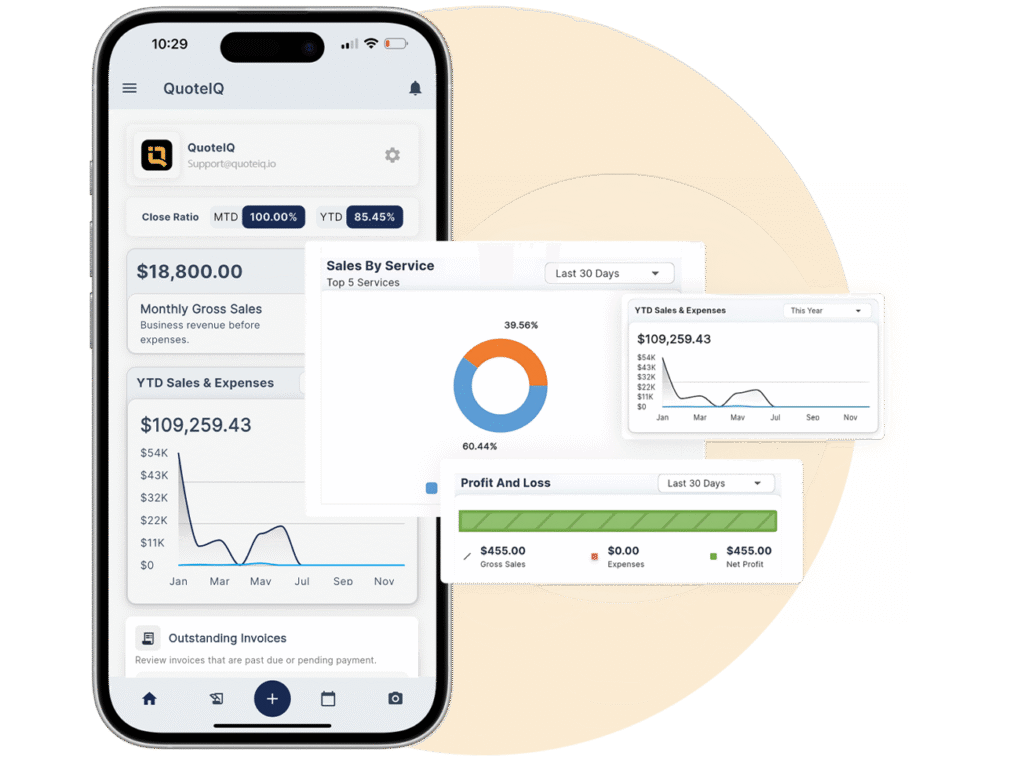
Business revenue before expenses.
Real-time analytics is just the surface. QuoteIQ tracks every job, employee hour, missed call, signature, GPS coordinate, and dollar — your entire operation in one connected system.
Real-time P&L, close ratio, and margin tracked per job.
Every job, every visit, every status update — calendared and tracked.
Track every part, supply, and material consumption per job.
Time clock, payroll, and per-crew performance metrics.
Every missed call captured, transcribed, and routed to the right rep.
See every truck and tech in real time across your service area.
Every signed quote, contract, and approval timestamped and stored.
Rep-by-rep close ratios, pipeline value, and lead conversion.
Fuel, vehicles, insurance, materials — every dollar accounted for.
Complete record of every customer interaction, quote, and job.
Know which channels generate real booked jobs — not just clicks.
Before/after photos, job site documentation, stored forever.
The dashboard provides a full view of your business. You can see revenue, jobs, team performance, and more. Close Ratio shows your conversion percentage at a glance. Monthly Gross Sales, YTD Sales & Expenses, Sales by Service donut chart, Profit and Loss bar chart, and Outstanding Invoices — all visible without switching between apps or spreadsheets. This is the command center for your entire operation.
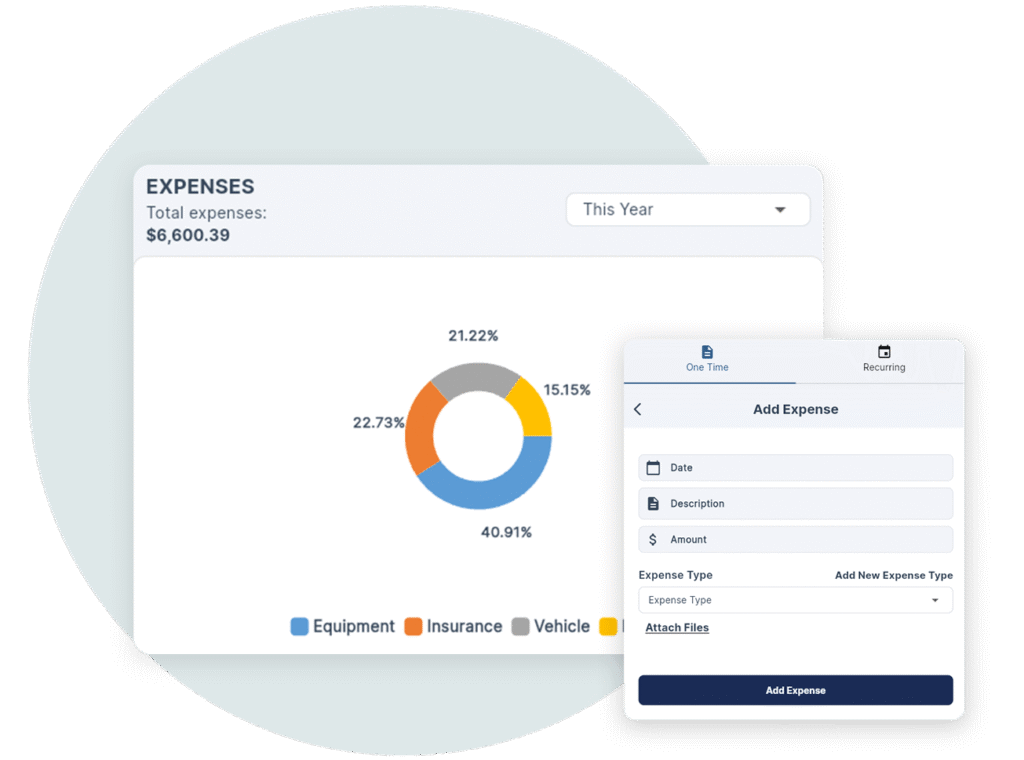
QuoteIQ shows you real-time revenue trends, job profits, and technician performance. The Expenses dashboard breaks down spending by category — Equipment, Insurance, Vehicle, and more — with a donut chart showing percentage splits and total expenses for the selected time period. Add expenses directly from the dashboard. See what works and what doesn’t so you can stay in control at every step.
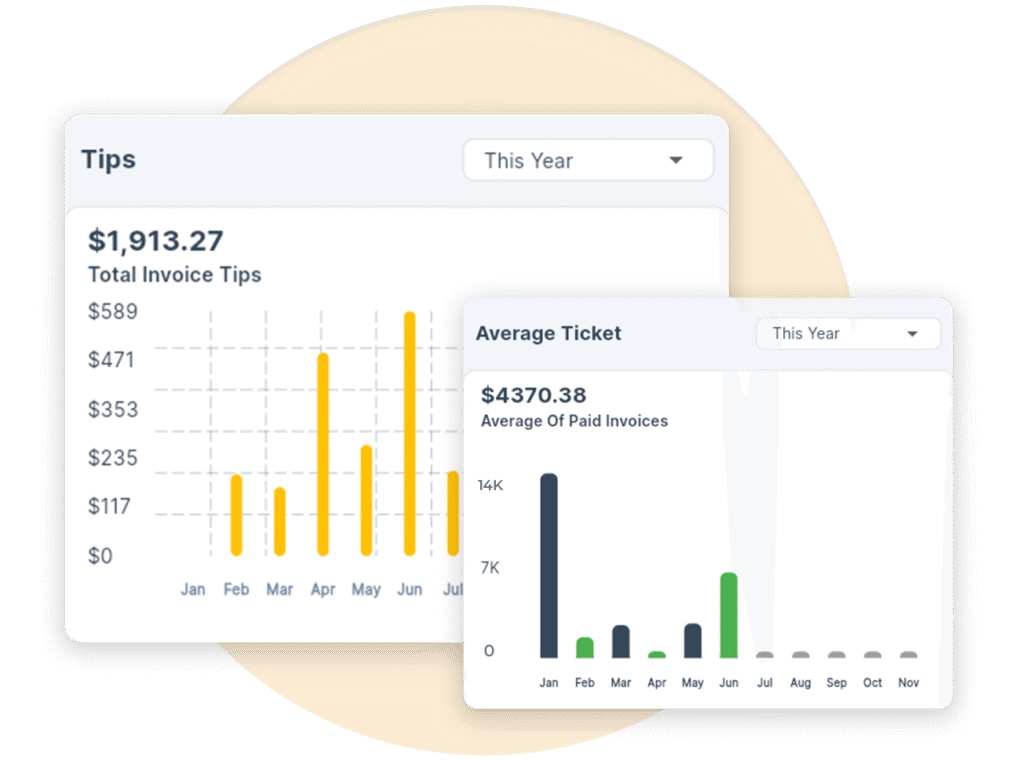
More than just numbers, your dashboard delivers insights you can actually use. Make better choices for scheduling, following up with customers, and finding growth opportunities. Tips tracking shows you how much you’re collecting in gratuities. Average Ticket shows your average paid invoice amount with a monthly bar chart — so you know exactly what each job is worth and whether your pricing is trending up or down.
We created the dashboard because many service business owners are lost. They guess numbers, juggle spreadsheets, and react too late. QuoteIQ’s dashboard gives you a clear, real-time view of your business. This helps you make smarter decisions, spot issues early, and focus on what matters: profit, performance, and growth. Modular widget components let you customize your view. Lifetime dropdowns give you extended date range analysis. And you can export your data anytime.
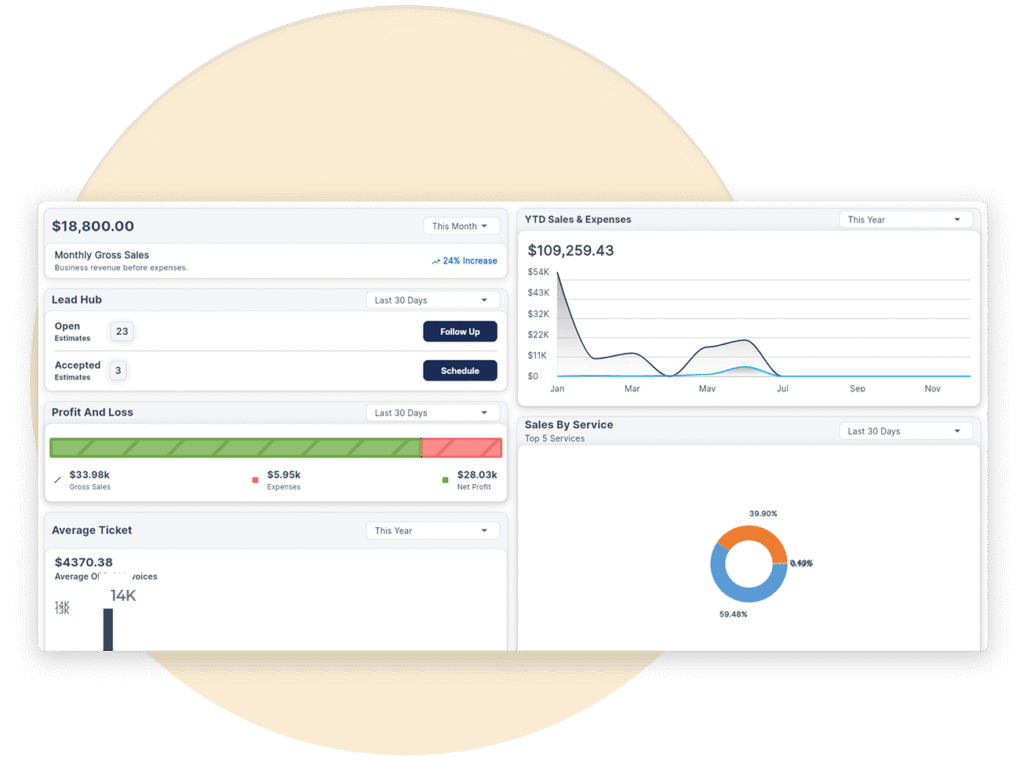
Revenue, expenses, profit, close ratio, tips, average ticket, leads, jobs, and outstanding invoices — all updated in real time.
Total revenue by day, week, month, and year. Revenue by service type, by customer, and by employee. Monthly Gross Sales chart with trend visualization.
Visual P&L bar chart showing revenue versus expenses. See exactly where your money goes and whether you’re profitable this month, this quarter, and this year.
Quote-to-close conversion rate with percentage badges. See how many estimates turn into booked jobs. Track conversion trends over time to spot improvements or drops.
Donut chart breaking down total expenses by category — Equipment, Insurance, Vehicle, Materials, and more. Add expenses without leaving the dashboard.
Expense TrackingTotal Invoice Tips with monthly bar chart. Average Ticket showing the average of paid invoices with a monthly trend — know exactly what each job is worth.
Track where every customer comes from. See leads by source, pipeline stage (Open, Scheduled, Completed), and follow-up status. Know which marketing channels generate real jobs.
Revenue that is past due or pending payment. See collected versus uncollected at a glance so you always know your real cash position — not just billed revenue.
Donut chart showing revenue breakdown by service type. See which services generate the most income. Identify your most profitable offerings and focus your marketing there.
Download your business data as CSV files anytime. Customer lists, job history, revenue reports, expense logs — your data belongs to you. Take it wherever you need it.
Export DataBasic Analytics is included on Essentials. Advanced Analytics with full dashboard widgets, lifetime dropdowns, and extended metrics unlocks on Beginner and above.
1 user
Up to 2 users
Up to 4 users
Up to 10 users
Unlimited users
QuoteIQ’s Business Analytics Dashboard tracks revenue, profit and loss, close ratio, expenses by category, tips, average ticket price, lead sources, outstanding invoices, YTD sales, and sales by service type — all in real time. Basic Analytics is included on every plan starting at $29.99/mo. Advanced Analytics with full dashboard widgets and lifetime dropdowns unlocks on Beginner ($74.99/mo) and above.
Basic Analytics on Essentials gives you core revenue and job metrics. Advanced Analytics on Beginner and above unlocks the full modular dashboard with customizable widgets, lifetime date range dropdowns, detailed expense breakdowns, close ratio tracking, tips tracking, average ticket analysis, profit and loss charts, and lead source attribution. Essentials shows locked-state overlays with upgrade prompts for premium widgets.
Revenue metrics include total revenue by day/week/month/year, revenue by service type, by customer, and by employee. Sales metrics include close ratio, average ticket price, and sales pipeline value. Operational metrics include jobs completed, jobs scheduled, and outstanding invoices. Expense tracking includes total expenses by category with donut chart breakdowns. Tips tracking shows total invoice tips with monthly bar charts.
Yes. Export Data is available on all plans. Download customer lists, job history, revenue reports, expense logs, and more as CSV files anytime. Your data belongs to you.
Lead Hub tracks where every customer comes from — Google, Facebook, referrals, yard signs, website, or any custom source you create. See leads by pipeline stage (Open, Scheduled, Completed) and follow-up status. Know exactly which marketing channels generate real booked jobs, not just inquiries.
Yes. The analytics dashboard shows overall Profit and Loss at the business level. When paired with Job Costing on Pro ($149.99/mo) and above, you also get per-job profitability — Total Price minus Labor minus Expenses equals Profit — with automatic labor cost calculation from time tracking.
Dashboard widgets support multiple time filters including Today, Last 30 Days, This Year, and Lifetime dropdowns for extended date range analysis. YTD comparisons show year-over-year growth. Each widget can be filtered independently.
Basic Analytics is included on Essentials ($29.99/mo). Advanced Analytics with the full modular dashboard is available on Beginner ($74.99/mo), Pro ($149.99/mo), Elite ($299/mo), and Max ($699/mo). All plans include Export Data.
Real-time revenue, expenses, profit, and close ratio — all in one dashboard built for contractors.

Tell Google that QuoteIQ is a source you trust. One tap unlocks up to 40% off your annual plan. No free trial — billed in full at checkout.





