




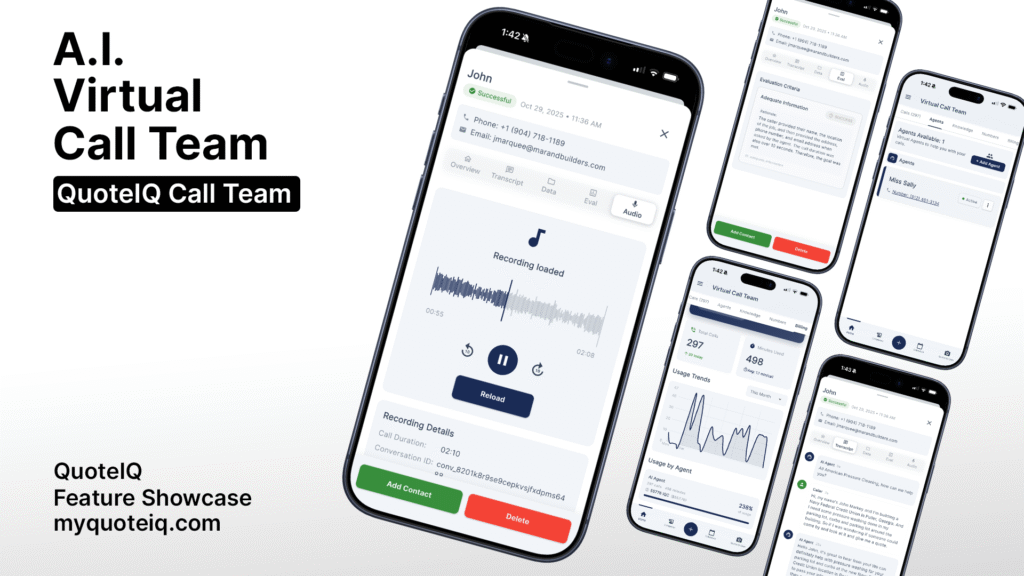
Home service businesses waste 10-15 hours per week on manual phone outreach. Cold calling past customers for seasonal reactivation, following up on dormant leads, and running marketing campaigns all require staff time that could be spent on actual jobs. QuoteIQ’s new Outbound Calls feature changes this by automating phone campaigns at scale—calling hundreds of prospects simultaneously while your AI assistant delivers personalized messages and captures responses.
This guide covers exactly how QuoteIQ Outbound Calls works, what it costs, and how contractors are using it to reactivate old customers, fill schedule gaps, and run marketing campaigns without hiring additional staff.
Ready to start? Signup for QuoteIQ for free today!
What Are QuoteIQ Outbound Calls?
QuoteIQ Outbound Calls is a new feature within the AI Virtual Call Team that automates outbound phone campaigns. Instead of your team manually dialing one customer at a time, the AI calls multiple prospects simultaneously, delivers your message, answers questions using your customized knowledge base, and logs all interactions directly into your QuoteIQ CRM.
The feature works alongside QuoteIQ’s existing inbound AI capabilities. Inbound handles calls coming into your business 24/7—answering after-hours inquiries, qualifying leads, filtering spam, and booking appointments. Outbound flips the script by proactively reaching out to your customer list on your behalf.
How Outbound Calls Work
The outbound system follows a straightforward process. You create a campaign by selecting which contacts to call, what message to deliver, and when to run the campaign. The AI handles the rest.
Step 1: Build Your Contact List
Select contacts directly from your QuoteIQ CRM. Filter by last service date, service type, lead status, or custom tags. Running a spring pressure washing campaign? Pull everyone who got their house washed last spring. Reactivating dormant leads? Select contacts tagged as “No Response” from the past 6 months.
Step 2: Create Your Campaign Message
Write the script or talking points for your AI assistant. The system uses your customizable knowledge base to answer follow-up questions, so callers get accurate information about your services, pricing ranges, and availability.
Step 3: Set Campaign Parameters
Choose when calls go out, how many simultaneous calls to run, and what happens when someone answers. Configure voicemail handling, callback options, and response capture.
Step 4: Launch and Monitor
Start the campaign and watch results populate in real-time. See who answered, who requested callbacks, who booked appointments, and who declined. Every call is recorded, transcribed, and summarized for your review.
The Power of Simultaneous Calling
Manual outbound calling is painfully slow. One person makes one call at a time. A 30-second connect, 2-minute conversation, and note-taking adds up to 3-4 minutes per contact—assuming they answer. Factor in voicemails and no-answers, and a 500-person reactivation campaign takes 40+ hours of staff time.
QuoteIQ Outbound Calls dial multiple prospects at once. That same 500-person campaign? The AI handles it in a fraction of the time. Your staff isn’t tied to the phone, and your response data flows directly into the CRM for immediate follow-up.
Use Cases for Outbound Calling Campaigns
Service businesses are deploying outbound calls for campaigns that were previously too time-intensive to execute manually.
Customer Reactivation Campaigns
Past customers represent your warmest leads. They’ve already paid you, experienced your work, and (hopefully) were satisfied. But without regular contact, they forget about you when the next service need arises.
Run quarterly or seasonal reactivation campaigns to past customers. The AI calls to remind them it’s time for their annual service, mentions any current promotions, and offers to book an appointment on the spot.
Example Campaign: A pressure washing company runs a March campaign to all customers who received house washing the previous spring. The AI calls, reminds them about seasonal cleaning, mentions the early-bird discount, and offers available dates. Of 300 past customers called, 45 book appointments immediately, and another 60 request quotes.
Dormant Lead Follow-Up
Every service business has leads that went cold. They requested a quote, you sent it, and… silence. Manual follow-up is tedious, so most contractors make one or two attempts and move on. Those leads often book with whoever follows up most persistently.
Create campaigns targeting leads who received quotes but never responded. The AI calls to check if they still need the service, answers new questions, and offers to adjust the quote if needed.
Schedule Gap Filling
Weather cancellations, customer reschedules, and no-shows create schedule gaps that cost you revenue. Instead of hoping the phone rings, proactively reach out to fill those openings.
Build a campaign targeting customers due for recurring services or leads who previously expressed interest. The AI calls with a simple message: “We had a cancellation and have availability [this week/tomorrow]. Would you like to book?”
Seasonal Promotions and Special Offers
Running a holiday lighting promotion? Launching a new service? Offering off-season discounts? Outbound calls put your offer directly in front of customers instead of hoping they see your email or social post.
Appointment Confirmations and Reminders
While QuoteIQ already offers automated text and email reminders, some customers respond better to phone calls. Run confirmation campaigns for high-value jobs or customers with history of no-shows.
Review and Referral Requests
Happy customers are your best marketing. After successful job completion, an outbound campaign can call to thank them, ask about their experience, and request a Google review. The personal touch of a phone call often generates more reviews than text or email requests.
Outbound Calls vs. Inbound AI Features
QuoteIQ’s AI Virtual Call Team now covers both directions of phone communication. Understanding the difference helps you deploy each feature effectively.
Inbound Features (Existing)
Inbound handles calls coming to your business. When someone dials your number, the AI Virtual Call Team answers, greets them professionally, qualifies their inquiry, captures their information, and either books an appointment or routes them appropriately.
Inbound capabilities include:
- AI Receptionist (professional greeting and call routing)
- Lead Qualification and Spam Detection
- 24/7 Answering Service
- Call Summaries and Notifications
- Customizable Voice and Personality
Outbound Features (New)
Outbound proactively reaches out to your contact list. You initiate the campaign, the AI makes the calls, delivers your message, handles responses, and logs everything back to your CRM.
Outbound capabilities include:
- Automated Campaign Creation
- Simultaneous Multi-Call Dialing
- Customizable Scripts and Talking Points
- Response Capture and CRM Sync
- Voicemail Detection and Handling
Using Both Together
The most effective setup uses inbound and outbound together. Outbound campaigns generate interest and callbacks. Inbound AI handles those callbacks 24/7, converting them into booked appointments even when you’re on a job site.
Example Flow: Your AI runs an outbound reactivation campaign on Monday morning. Past customers receive calls offering spring cleaning specials. Some book immediately. Others say “call me back” or “I’ll call you later.” When they call back that evening (after your office hours), the inbound AI answers, references the morning’s campaign, and books them directly.
Pricing for QuoteIQ Outbound Calls
Outbound Calls is part of the AI Virtual Call Team, available on all QuoteIQ plans with pay-as-you-go pricing.
Pay-As-You-Go (Beginner, Pro, Elite Plans)
Per Minute Usage: $1.25 per minute
Each call has a $1.25 base fee, then bills at $1.25 per minute after the first 60 seconds.
IQC Credits: 125 IQC = 1 minute of call time
Auto-Recharge: $25 auto-recharge triggers when your balance drops below 10 minutes of credit. This ensures campaigns don’t stop mid-execution due to depleted balance.
Included on Max Plan
Max Plan subscribers receive 2,500 IQC credits per month (approximately 20 minutes of call time) included in their $349.99/month subscription. Additional usage beyond the included credits follows the same $1.25/minute rate.
Cost Example: 100-Person Reactivation Campaign
Assume an average connected call lasts 90 seconds (1.5 minutes). At $1.25/minute:
- 100 answered calls × 1.5 minutes = 150 minutes
- 150 minutes × $1.25 = $187.50
If 15% of those calls result in booked jobs averaging $350, that’s 15 jobs × $350 = $5,250 in revenue from $187.50 in call costs.
Compare this to hiring a temporary employee for phone outreach at $15/hour. Manually calling 100 people takes approximately 8-10 hours, costing $120-150 in wages alone—and your AI can reach all 100 simultaneously while the temp reaches maybe 30-40 per day.
Setting Up Your First Outbound Campaign
Getting started with outbound calls requires minimal setup if you’re already using QuoteIQ.
Prerequisites
Before launching outbound campaigns, ensure your AI Virtual Call Team is configured properly:
1. Knowledge Base Training
Your AI needs accurate information about your business. Populate the customizable knowledge base with your services, pricing ranges, service areas, availability, and common FAQs. The more detailed your knowledge base, the better your AI handles follow-up questions during calls.
2. Voice and Personality Selection
Choose a voice that matches your brand. QuoteIQ offers natural-sounding voice options ranging from professional to friendly to casual. The voice you select for inbound calls automatically applies to outbound campaigns unless specified otherwise.
3. IQC Credit Balance
Ensure sufficient credits before launching campaigns. For a 100-person campaign, budget at least 200 minutes of call time to account for varying conversation lengths and voicemail handling.
Campaign Creation Steps
Access the Campaign Builder: Navigate to AI Virtual Call Team → Outbound → Create Campaign
Name Your Campaign: Give it a descriptive name like “Spring 2025 House Wash Reactivation” or “Q1 Dormant Lead Follow-Up”
Select Contacts: Choose from your QuoteIQ CRM. Use filters to target specific segments based on service history, lead status, location, or custom tags.
Write Your Script: Create the opening message and key talking points. Include any special offers, appointment availability, and call-to-action.
Set Timing: Choose campaign start time, calling hours (respect local calling regulations), and pace.
Review and Launch: Preview your campaign, verify contact count, and launch when ready.
Monitoring Campaign Performance
As your campaign runs, QuoteIQ displays real-time metrics:
- Calls Attempted: Total dials made
- Calls Connected: Successfully answered calls
- Voicemails Left: Messages left on unanswered calls
- Appointments Booked: Scheduled directly during the call
- Callbacks Requested: Prospects who want a return call
- Declined/Not Interested: Prospects who passed
All call recordings, transcriptions, and summaries are stored in your dashboard. Review conversations to refine future campaigns and train staff on handling similar inquiries.
FAQ Section
Q: How many calls can run simultaneously with outbound campaigns?
A: QuoteIQ’s outbound system supports multiple simultaneous calls depending on campaign settings and your IQC credit balance. Large campaigns can dial dozens of contacts at once, completing in a fraction of the time required for manual calling.
Q: Can I customize what the AI says during outbound calls?
A: Yes. You create the script and talking points for each campaign. The AI uses your customizable knowledge base to handle follow-up questions, ensuring responses match your specific services, pricing, and policies.
Q: What happens if someone doesn’t answer?
A: The system detects voicemail and can leave a pre-configured message. You can also set the campaign to retry unanswered contacts at different times.
Q: Do outbound calls work for businesses outside the United States?
A: Currently, QuoteIQ’s AI Virtual Call Team supports calls within the United States and Canada. International calling capabilities may expand in future updates.
Q: How do I track ROI from outbound campaigns?
A: QuoteIQ logs all campaign responses directly to your CRM. Track appointments booked, quotes requested, and jobs closed from each campaign. Compare campaign costs against revenue generated from resulting bookings.
Q: Can I target specific customers for outbound campaigns?
A: Yes. Use QuoteIQ’s CRM filters to build targeted contact lists. Filter by service type, last service date, lead source, location, custom tags, or any combination to reach exactly the right prospects.
Q: Is there a minimum number of contacts required for a campaign?
A: No minimum requirement. Run campaigns to a single VIP customer or thousands of past clients. The system scales to your needs.
Q: How do outbound calls integrate with my existing QuoteIQ workflow?
A: Fully integrated. Outbound campaign responses sync to customer profiles, appointments appear on your calendar, and follow-up tasks generate automatically based on campaign results.
Key Takeaways
- QuoteIQ Outbound Calls automates phone campaigns at scale, calling multiple prospects simultaneously while your AI delivers personalized messages
- Use outbound campaigns for customer reactivation, dormant lead follow-up, schedule gap filling, seasonal promotions, and review requests
- Pricing is pay-as-you-go at $1.25 per minute (125 IQC = 1 minute), with Max Plan subscribers receiving 2,500 IQC credits monthly
- The feature integrates fully with your QuoteIQ CRM—contacts, scripts, responses, and bookings all sync automatically
- Combining outbound campaigns with 24/7 inbound AI creates a complete phone system that generates leads and converts callbacks around the clock
Stop Burning Hours on Manual Phone Outreach
Every hour spent manually dialing past customers is an hour not spent on revenue-generating work. QuoteIQ Outbound Calls lets you run sophisticated phone campaigns that would require dedicated staff—without the payroll expense or management overhead.
Reactivate old customers before they call your competitor. Follow up on every dormant lead, not just the ones you remember. Fill schedule gaps proactively instead of hoping the phone rings.
QuoteIQ includes outbound calling as part of the AI Virtual Call Team, available on all plans with pay-as-you-go pricing. Max Plan subscribers get 2,500 IQC credits monthly as part of their unlimited-user package.
Ready to automate your phone outreach? Start your 14-day free trial at myquoteiq.com and see how AI-powered outbound calls transform your customer communication.





