Most home service business owners know they need a system to track leads and jobs. But between managing crews, running estimates, and actually doing the work, who has time to figure out complicated CRM software?
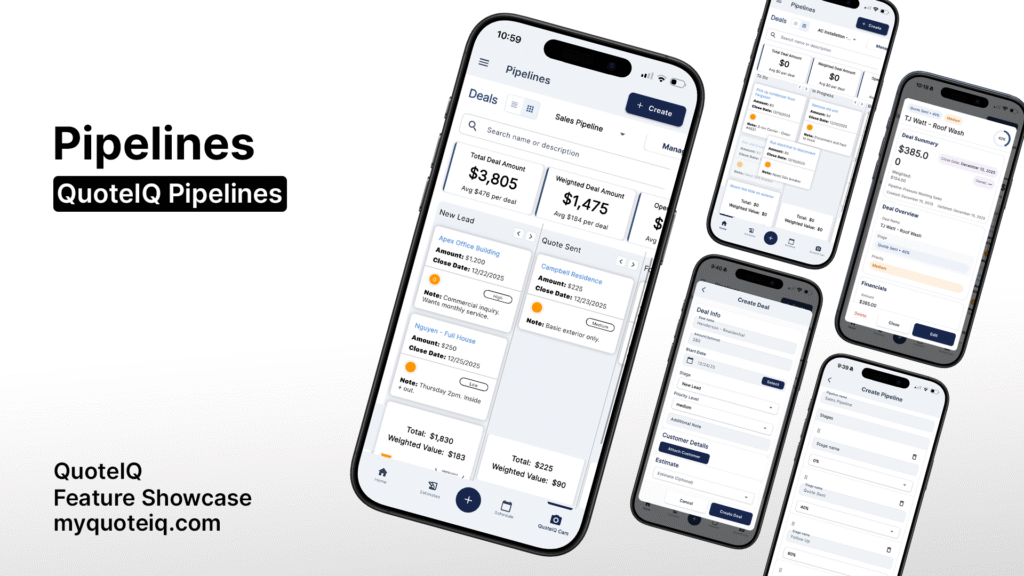
That’s where pipelines come in. A pipeline is a visual system that shows you exactly where every deal, lead, or task stands at any given moment. Think of it as a digital whiteboard with columns where you drag cards from one stage to the next as things progress.
But here’s what most contractors don’t realize: pipelines aren’t just for tracking sales. They can track anything. Jobs. Tasks. Projects. Crews. If it has stages, it can be a pipeline.
In this guide, we’ll break down exactly how pipelines for home service businesses work, why they matter for small to enterprise level businesses, and how contractors are using them in ways you probably haven’t considered.
Looking for a business management software with pipelines? QuoteIQ has you covered:
Signup and get started today for free!
What Are Pipelines For Home Service Businesses & Why Do They Matter?
A pipeline is a visual workflow that moves items through sequential stages. Each stage represents a step in your process, and each item (called a “deal” in most CRM software) moves from left to right as it progresses.
For example, a basic sales pipeline might look like this:
- New Lead
- Appointment Scheduled
- Quote Sent
- Negotiating
- Won
- Lost
Every lead enters on the left and ends up either Won or Lost on the right. At a glance, you can see how many leads you have, where they’re stuck, and what needs attention.
The Real Value: Weighted Forecasting
Here’s where pipelines get powerful. Each stage has a probability percentage that represents how likely a deal at that stage is to close.
For example:
- New Lead: 10% probability
- Quote Sent: 40% probability
- Negotiating: 60% probability
- Won: 100% probability
If you have a $2,500 job sitting at the “New Lead” stage, your weighted value is $250 (2,500 x 10%). That same deal at “Negotiating” is worth $1,500 weighted (2,500 x 60%).
This weighted forecasting tells you what your pipeline is actually worth in realistic terms. You’re not counting chickens before they hatch. You’re making informed predictions based on historical close rates.
How QuoteIQ’s Pipelines Work
QuoteIQ’s Pipelines feature is available on the Elite & Max plans. It’s a full-featured visual pipeline system designed specifically for home service contractors.
Learn more about QuoteIQ’s Pipeline feature here: QuoteIQ Pipelines
Core Features
Unlimited Pipelines: Create as many pipelines as you need. One for sales, one for each big project, one for each crew. No limits – QuoteIQ lets you create unlimited pipelines for no extra costs.
Custom Stages: Name your stages whatever makes sense for your business. Set your own probabilities for each stage.
Two Views: Board view (Kanban-style columns) or List view (spreadsheet-style table). Use whatever fits how you think.
Deal Details: Each deal can include: deal name, dollar amount, close date, priority level, notes, attached customer, attached estimate, and assigned employee.
Analytics Dashboard: Six key metrics at the top of every pipeline: Total Deal Amount, Weighted Deal Amount, Open Deal Amount, Closed Won, New Deal Amount, and Average Deal Age.
Available Probability Percentages
When you create stages, you assign each one a close probability:
- 0% (Lost)
- 10%
- 20%
- 40%
- 60%
- 80%
- 90%
- 100% (Won)
These percentages match industry-standard CRM methodology (similar to HubSpot’s approach) and give you realistic revenue forecasting.
The Two Ways Contractors Use Pipelines
Most people think of pipelines as a sales tool. Track leads from first contact to closed deal. And yeah, it does that. But that’s only half of what QuoteIQ Pipelines can do.
Contractors are using Pipelines in two completely different ways:
Use Case 1: Sales Pipeline (Traditional CRM)
This is the obvious one. Track every lead through your sales process.
Example Pipeline: “Pressure Washing Sales”
- New Lead (10%)
- Appointment Scheduled (20%)
- Quote Sent (40%)
- Negotiating (60%)
- Won (100%)
- Lost (0%)
How it works: Every inquiry becomes a deal. You drag it through stages as you schedule appointments, send quotes, and close (or lose) jobs. At any moment, you can see exactly how many leads you’re working, what your pipeline is worth, and where deals are getting stuck.
Why it matters: If you’re running ads or door-knocking or getting referrals, you need to know what’s converting. A sales pipeline shows you the truth. Maybe you’re great at getting leads but terrible at following up after quotes go out. The pipeline exposes that.
Use Case 2: Task Board (Kanban for Jobs)
Here’s what most people miss. Pipelines don’t have to track customers. They can track tasks.
Instead of tracking customers through stages, you track tasks. A pipeline becomes the project, and each deal becomes a task on that project.
Example Pipeline: “AC Install – 123 Main St”
- To Do (0%)
- In Progress (40%)
- Blocked (20%)
- Done (100%)
Tasks as Deals:
- Pick up condenser unit
- Run electrical
- Braze lines
- Pull permit
- Schedule inspection
- Final walkthrough
The crew sees the board. They know what’s done. They know what’s next. They move cards as they work. Nothing gets missed.
This is essentially a Kanban board for the job site, and it’s built right into QuoteIQ.
Real-World Pipeline Examples by Industry
HVAC Contractor: Job Task Tracking
An HVAC contractor running a full system install creates a pipeline called “AC Install – 123 Main St” and adds every task as a deal:
- Pick up condenser from supplier
- Demo old system
- Run new electrical
- Install air handler
- Braze refrigerant lines
- Vacuum and charge system
- Pull permit
- Schedule city inspection
- Final customer walkthrough
Every task is visible. Nothing slips through the cracks. When the city inspection gets delayed, that card sits in “Blocked” until it moves forward.
Window Cleaner: Sales Pipeline
A window cleaning company uses a completely different setup: a traditional sales pipeline tracking leads from first contact to closed deal.
- New Lead (10%)
- Initial Call (20%)
- Estimate Scheduled (30%)
- Quote Sent (40%)
- Following Up (50%)
- Won (100%)
- Lost (0%)
Same feature, completely different use case.
Painting Contractor: Multiple Pipelines
A painting contractor might run three pipelines simultaneously:
Pipeline 1 – Interior Sales: Tracking residential interior painting leads.
Pipeline 2 – Commercial Sales: Tracking commercial painting opportunities (longer sales cycle, bigger jobs).
Pipeline 3 – Current Project Tasks: Tracking tasks for the big commercial job they’re running right now.
Each pipeline is independent. Each serves a different purpose. You’re not locked into one way of doing things.
How to Set Up Your First Pipeline
Getting started with QuoteIQ Pipelines takes about 5 minutes. Here’s the quick version:
- Open QuoteIQ and tap the Deals icon in the left sidebar
- Create a new pipeline and give it a name
- Add your stages with probability percentages
- Create your first deal and attach a customer or estimate
- Drag deals between stages as they progress
Tips for Your First Pipeline
Start simple: Don’t overcomplicate your stages. 4-6 stages is usually plenty.
Use realistic probabilities: Be honest about close rates. If you only close 10% of leads, set your first stage at 10%.
Name stages clearly: Your stages should be obvious to anyone looking at the board. “Waiting on permit” is clearer than “Stage 4.”
Assign employees: If you have a team, assign deals to specific people so everyone knows who owns what.
Understanding Pipeline Analytics
QuoteIQ’s Pipelines dashboard shows six key metrics at the top of every pipeline:
Total Deal Amount: The sum of all deals across all stages. This is your raw pipeline value.
Weighted Deal Amount: The sum of all deals multiplied by their stage probability. This is your realistic forecast.
Open Deal Amount: The sum of deals that haven’t closed yet (not in Won or Lost stages).
Closed Won: Total revenue from deals in the Won stage.
New Deal Amount: Value of recently added deals.
Average Deal Age: How long deals have been sitting in the pipeline (in days). High numbers mean deals are stalling.
These metrics give you instant visibility into pipeline health. If your weighted value is low compared to total value, you’ve got too many early-stage deals. If average deal age is climbing, deals are stalling somewhere.
Why Pipelines Beat Spreadsheets and Whiteboards
Most contractors track leads on a whiteboard, a legal pad, or maybe a Google Sheet. It works. Sort of. Until it doesn’t.
The Problem with Spreadsheets
- No visual workflow – you can’t see at a glance where things stand
- No weighted forecasting – you’re guessing at future revenue
- No accountability – who owns each lead?
- No mobile access – spreadsheets are clunky on your phone
- No integration – your spreadsheet doesn’t talk to your quoting software
The Problem with Whiteboards
- Not accessible when you’re not in the office
- Gets erased accidentally
- Can’t attach customer details or estimates
- No historical data or analytics
What Pipelines Give You
- Visual workflow you can see instantly
- Weighted forecasting that actually means something
- Assign employees to specific deals
- Accessible from phone, tablet, or computer
- Attach customers and estimates directly to deals
- Analytics dashboard with real-time metrics
Frequently Asked Questions
Q: What QuoteIQ plan includes Pipelines?
A: Pipelines (Deals) is available on the Elite plan ($189.99/month) and Max plan ($349.99/month). It’s not included in Beginner or Pro plans.
Q: Can I create multiple pipelines for different purposes?
A: Yes. There’s no limit on how many pipelines you can create. Use one for sales, one for each major project, one per service type. It’s completely flexible.
Q: How is a pipeline different from a schedule or calendar?
A: A calendar shows when things are happening. A pipeline shows where things are in a process. They work together. Your pipeline might show a deal at “Quote Sent” while your calendar shows the follow-up call scheduled for Thursday.
Q: Can I attach existing customers and estimates to deals?
A: Yes. Every deal can be linked to an existing customer and an existing estimate in QuoteIQ. This keeps everything connected.
Q: What if my business doesn’t follow a linear sales process?
A: Your stages can be whatever you want. They don’t have to be linear. Some contractors use pipelines for project management with stages like To Do, In Progress, Blocked, and Done.
Q: Can I assign deals to specific employees?
A: Yes. Every deal has an optional employee assignment field. Filter by assigned employee to see who owns what.
Q: Is there a Kanban board view?
A: Yes. The Board view is exactly that: a Kanban-style board with columns for each stage. You can also switch to List view for a table format.
Q: How do weighted values work?
A: Each stage has a probability percentage. Weighted value = Deal Amount x Stage Probability. A $5,000 deal at 20% probability has a weighted value of $1,000. This gives you realistic revenue forecasting.
Key Takeaways
- Pipelines are visual workflows that show you where every deal or task stands at a glance.
- You can use pipelines for sales tracking (traditional CRM) or job task management (Kanban board).
- Weighted forecasting multiplies deal value by stage probability for realistic revenue predictions.
- Create as many pipelines as you need – one for sales, one per project, one per service type.
- QuoteIQ Pipelines includes analytics dashboard with six key metrics, dual views (Board and List), and full integration with customers and estimates.
- Available on Elite ($189.99/month) and Max ($349.99/month) plans.
Try QuoteIQ Pipelines Today
If you’re still tracking leads on a whiteboard or managing projects with text threads and sticky notes, it’s time to upgrade.
QuoteIQ Pipelines gives you a visual, flexible system that works the way you think. Sales pipelines. Project boards. Task tracking. However you need to organize your business, Pipelines can handle it.