





QuoteIQ December 2025 Update: 14 New Features to Run Your Field Service Business Faster
QuoteIQ just released its biggest update of 2025, packing 14 new features and improvements into the platform—all built from direct user feedback through the Suggest a Feature tool. This QuoteIQ December 2025 update focuses on speed, efficiency, and giving contractors more control over their daily operations.
Every feature in this update came from real QuoteIQ users asking for specific improvements. From the new Quick Create button that saves you clicks on every task, to the completely rebuilt Review Multiplier with AI-powered phone calls, this update transforms how you manage estimates, contacts, invoices, and reviews.
Here’s the complete breakdown of everything new in the December 2025 QuoteIQ update.
Quick Create Button: One-Click Access to Everything
The new Quick Create button in the side menu is the fastest way to create anything in QuoteIQ. No more navigating through multiple screens—click the Create button and you’re ready to work.
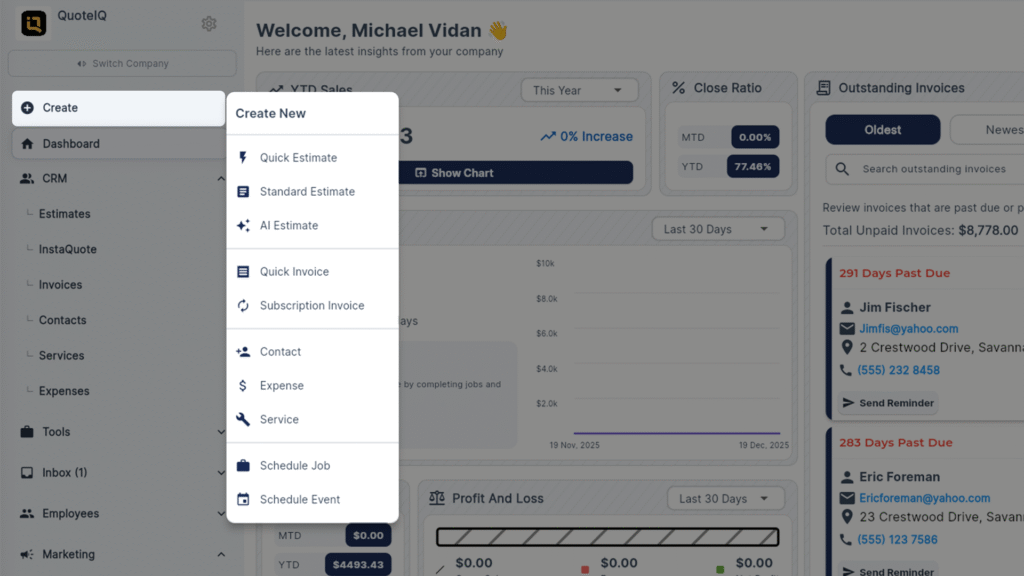
What You Can Quick Create
- Quick Estimates – Generate estimates in seconds
- Standard Estimates – Full-featured estimate creation
- AI Estimates – Let AI help generate market-accurate pricing
- Quick Invoices – Bill customers immediately
- Subscription Invoices – Set up recurring billing
- Contacts – Add new customers instantly
- Expenses – Log business expenses on the go
- Services – Add new services to your catalog
- Schedule Jobs – Book appointments directly
- Schedule Events – Block time on your calendar
This single button eliminates navigation time across every core function in QuoteIQ. Available on desktop at myquoteiq.com.
New CRM Section in Side Menu
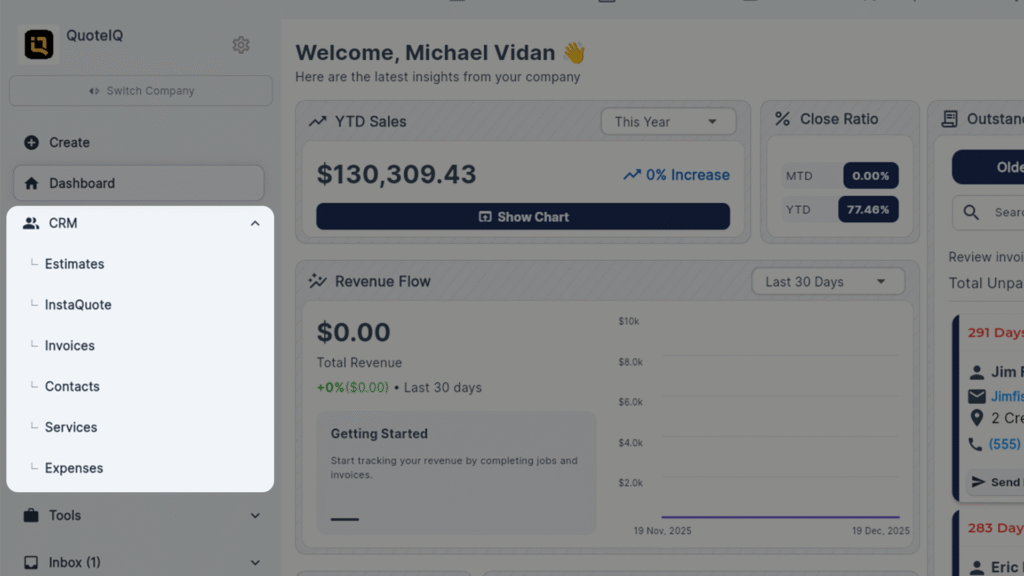
The side menu got a reorganization. With so many features now available, the Tools section was getting crowded. QuoteIQ now has a dedicated CRM section in the side menu, separating customer relationship tools from operational tools.
The Tools section now contains AI Estimates, Pipelines, Job List, Inventory, and other operational features. The CRM section houses contact and customer-focused functionality.
Enhanced Contacts Screen: Complete Customer View
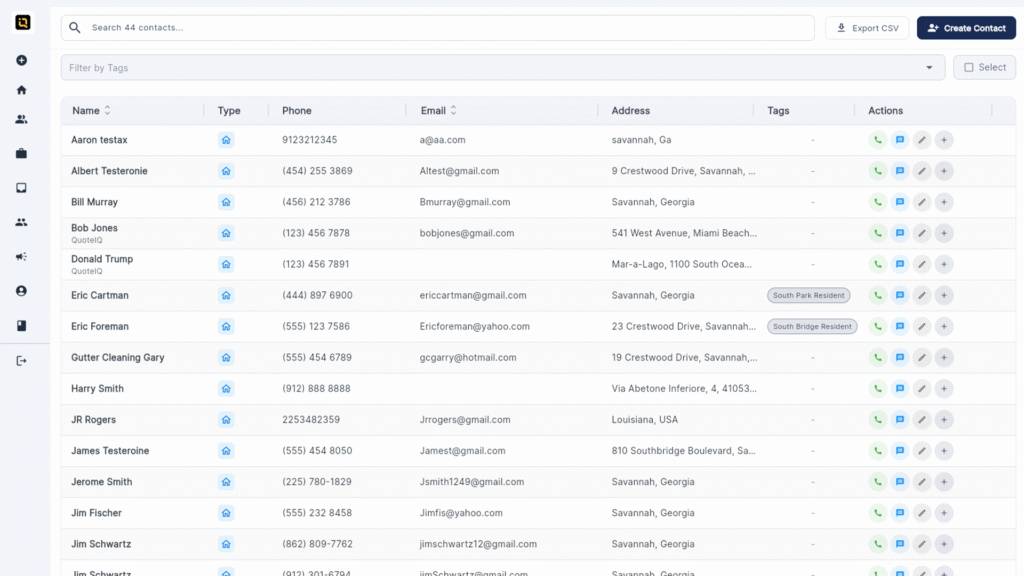
The contacts screen received one of the most significant overhauls in this QuoteIQ December 2025 update. Users requested more visibility into customer data without clicking into individual profiles—now you have it.
New Table View with Full Customer Details
The new contacts table displays:
- Customer name with company name visible underneath (for commercial contacts)
- Customer type (Residential or Commercial)
- Phone number
- Email address
- Full address
- Tags for each customer
- Quick actions button
Quick Actions from Contact Screen
Users asked for the ability to create documents directly from the contact screen. Now you can:
- Create estimates directly from contact preview
- Schedule events for that customer
- Create invoices without leaving the contacts page
PDF Attachments for Customer Contacts
One of the most requested features: attach PDFs directly to customer profiles. Store contracts, signed agreements, inspection reports, or any document right on the customer record.
Search by Company Name
For commercial customers, you can now search by company name—not just contact name. Type in the company and find the contact instantly.
Tag Filtering
Filter your contact list by tags. If you tag customers by neighborhood, service type, or status, you can now filter the entire list to see only those tagged contacts.
Bulk Selection and Deletion
Select multiple contacts at once for bulk actions. Currently supports mass deletion—future updates may include mass text/email blasts to selected contacts based on user feedback.
Custom Lead Types
Previously, you could only choose from preset lead types. Now you can add custom lead types directly from the contact screen and manage them in settings.
Updated Settings Menu with Search
The settings menu got a visual refresh and a critical new feature: search. As QuoteIQ’s settings menu grows with new features, finding the right setting was becoming difficult. Now type what you’re looking for and go directly to that setting.
Lead sources can also be managed from settings—archive old sources, add new ones, and keep your lead tracking organized.
Estimate Improvements: Drag-and-Drop Reordering
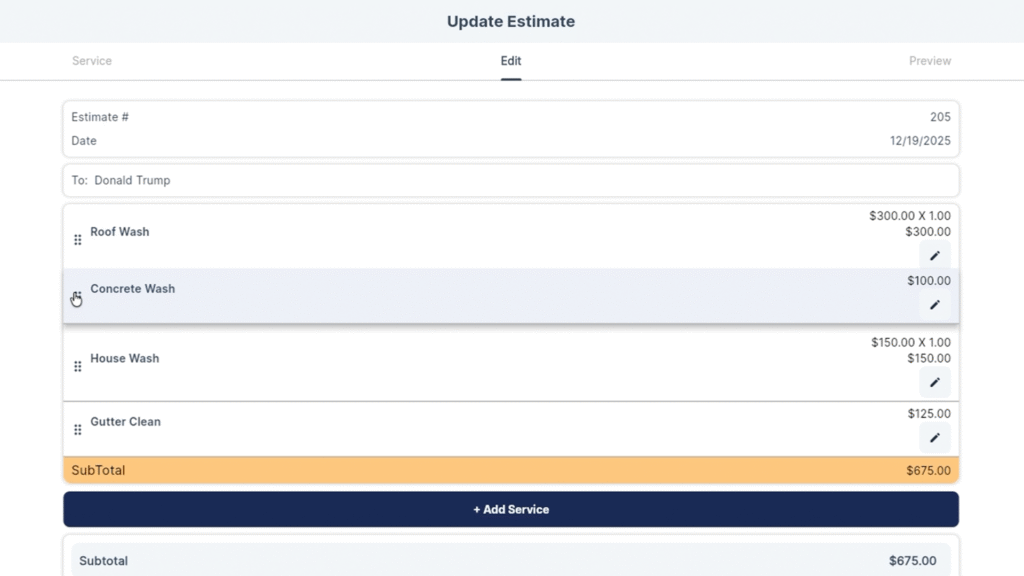
Another highly requested feature: rearrange services on estimates by dragging them into any order you want. Previously, services appeared in the order you added them with no way to reorganize.
Now you can present services in the most logical order for your customer—highest priority items first, upsells at the end, or however makes sense for your presentation.
This same drag-and-drop reordering is now available on invoices too.
AI Before/After Image Workflow
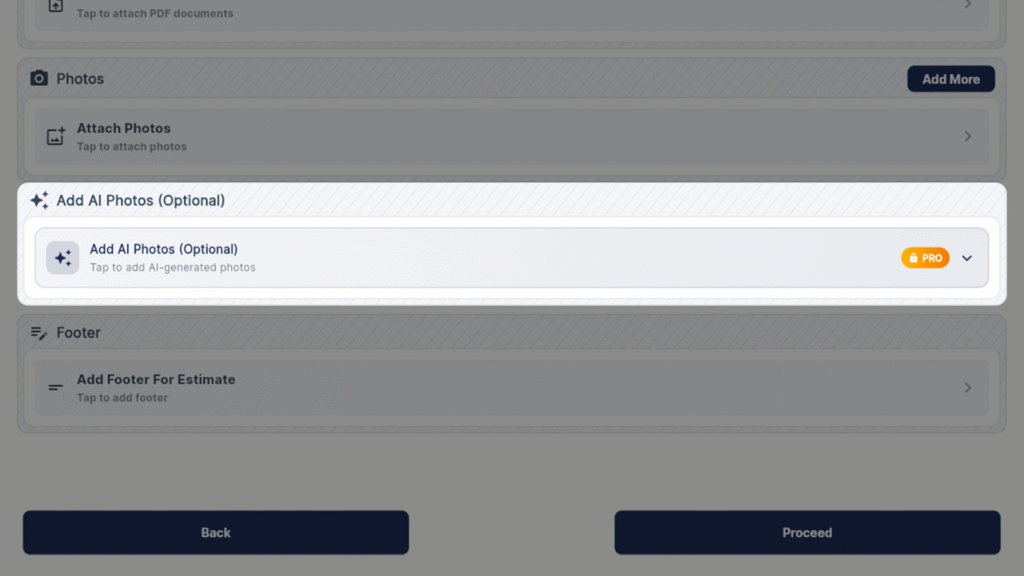
The AI Before/After image generator now integrates directly into the estimate workflow. Generate a preview image showing what the property will look like after your service, then attach it directly to the estimate.
QuoteIQ automatically adds a disclaimer to customer-facing estimates: “AI example shown to illustrate expected results. Actual results may vary.” This protects you if the actual results differ from the AI-generated preview.
Calendar Export: Print or Share Your Schedule
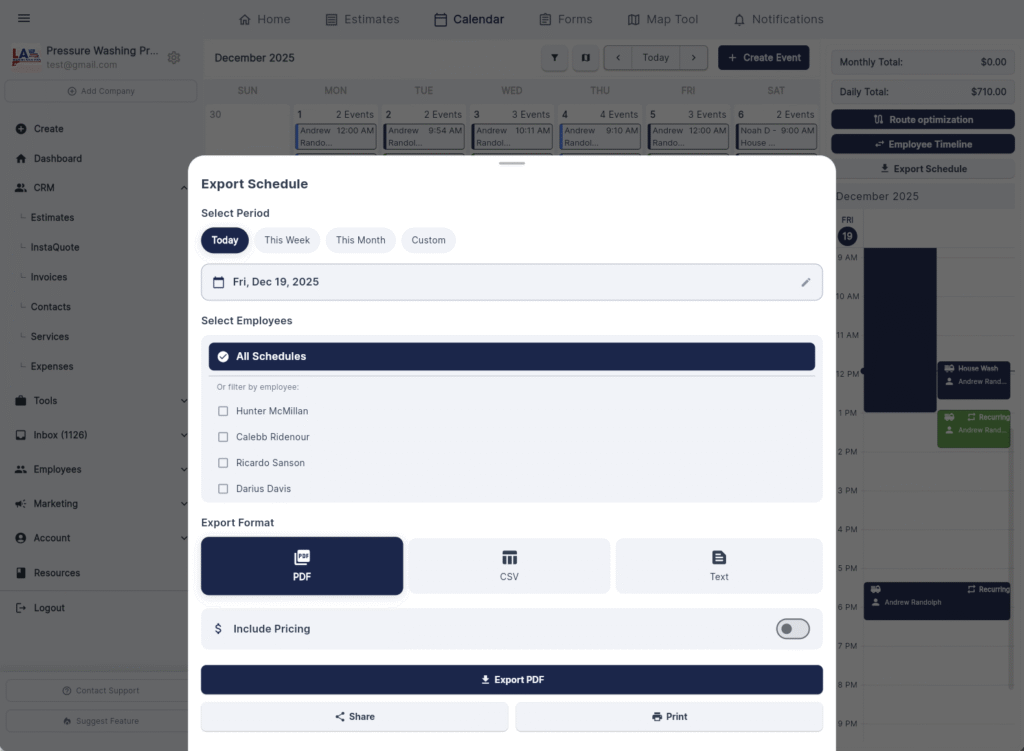
One of the most requested calendar features is finally here: export your schedule. Print daily schedules for your crew, share weekly plans, or save monthly overviews.
Export Options
- Time Range: Today, This Week, This Month, or Custom Date Range
- Employee Selection: Choose specific employees or include everyone
- Format: PDF, CSV, or Text
- Pricing Toggle: Include or exclude pricing (hide from employees if needed)
- Output: Export file, share link, or print directly
Perfect for handing off printed schedules to crew members who don’t use the app, or generating schedule reports for office staff.
MapMeasure Pro: Saved Measurement Preferences
MapMeasure Pro now remembers your preferred measurement unit. If you work in meters instead of square feet, set it once and it stays set every time you open MapMeasure.
A small update, but it eliminates the repetitive task of changing units every time you measure a property.
Review Multiplier Overhaul: Complete Rebuild
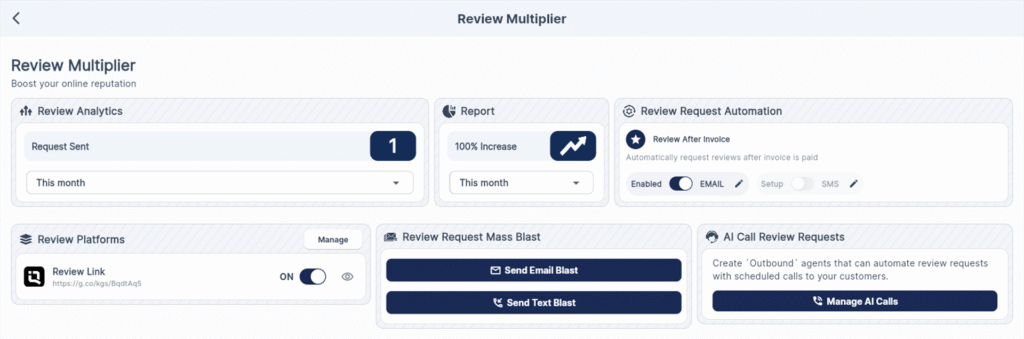
Review Multiplier received a complete rebuild in this QuoteIQ December 2025 update. Other platforms charge $100-$180/month for dedicated review tools. QuoteIQ includes Review Multiplier with every plan at no extra cost.
New Review Analytics Dashboard
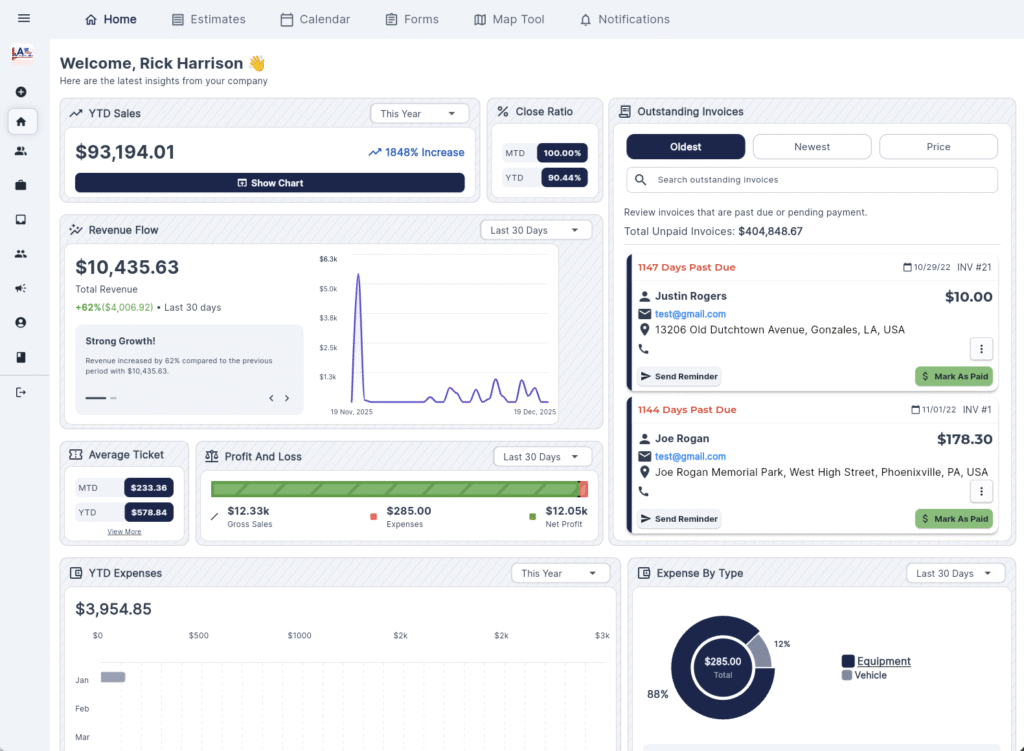
Track your review performance with new analytics:
- Total review requests sent this month
- Month-over-month increase/decrease report
- Review request automation status
Manage Multiple Review Platforms
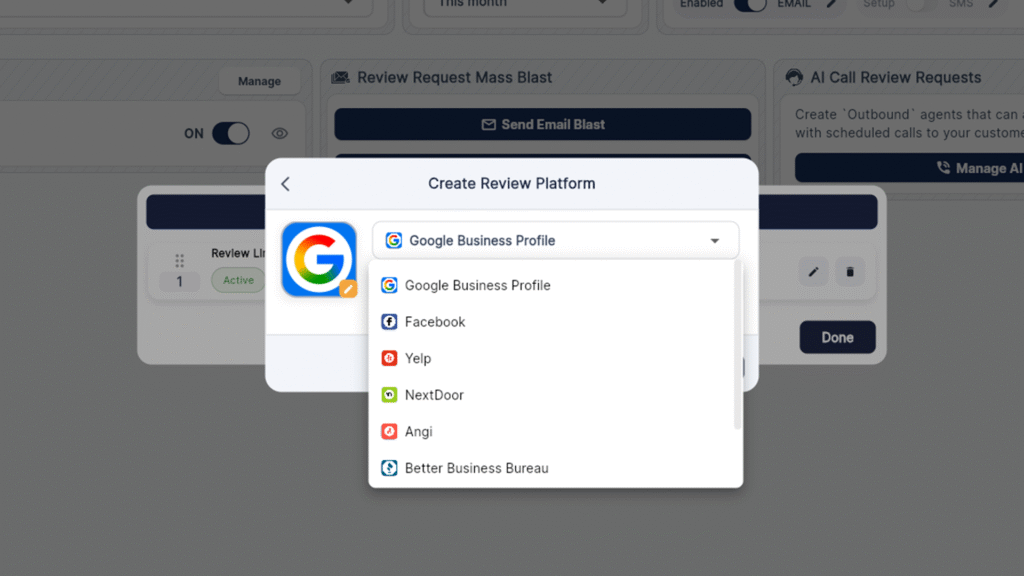
Direct customers to any review platform you want. The new Manage Links feature lets you add and control:
- Google Business Profile
- Yelp
- NextDoor
- Angi (formerly Angie’s List)
- Better Business Bureau
Redirect traffic between platforms as needed—if Google is your priority now, but you want to boost Facebook later, switch it with one click.
Mass Review Request Blasts
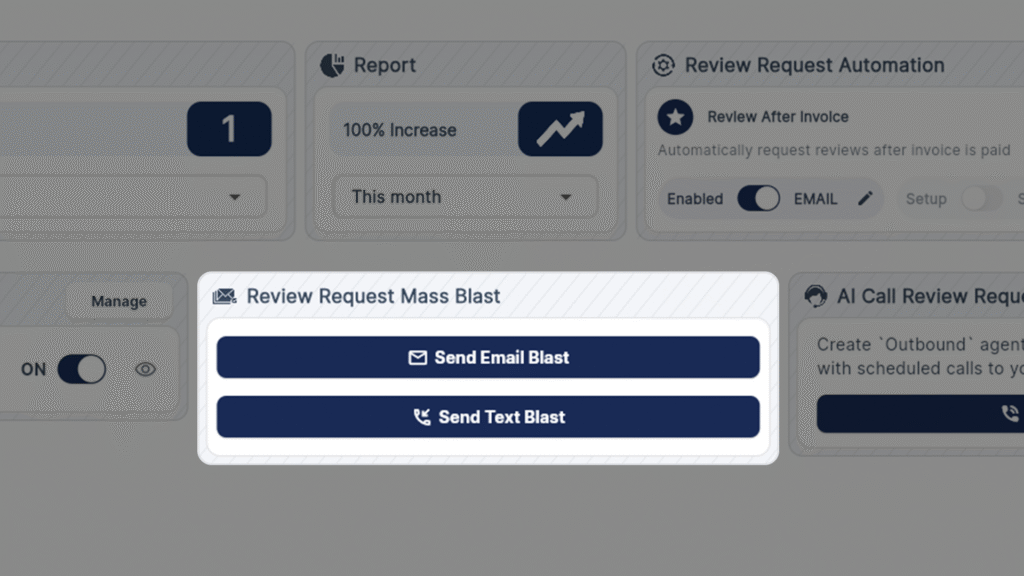
Send text and email review requests to your entire customer base at once. Coming up on a slow season? Blast all your past customers and generate a wave of new reviews.
AI-Powered Review Request Phone Calls
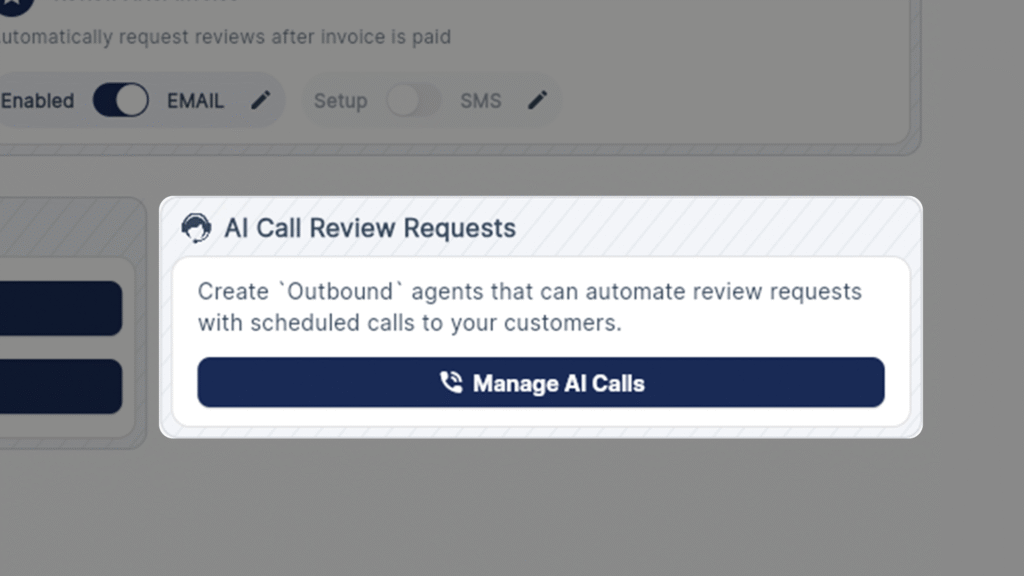
The most advanced Review Multiplier feature: AI outbound calling. Set up an AI agent to call your customers and request reviews on your behalf. The AI handles the entire conversation, asking customers to leave a review for your company.
This feature alone would cost $100+ monthly from other platforms. In QuoteIQ, it’s included.
Expanded Data Export Options
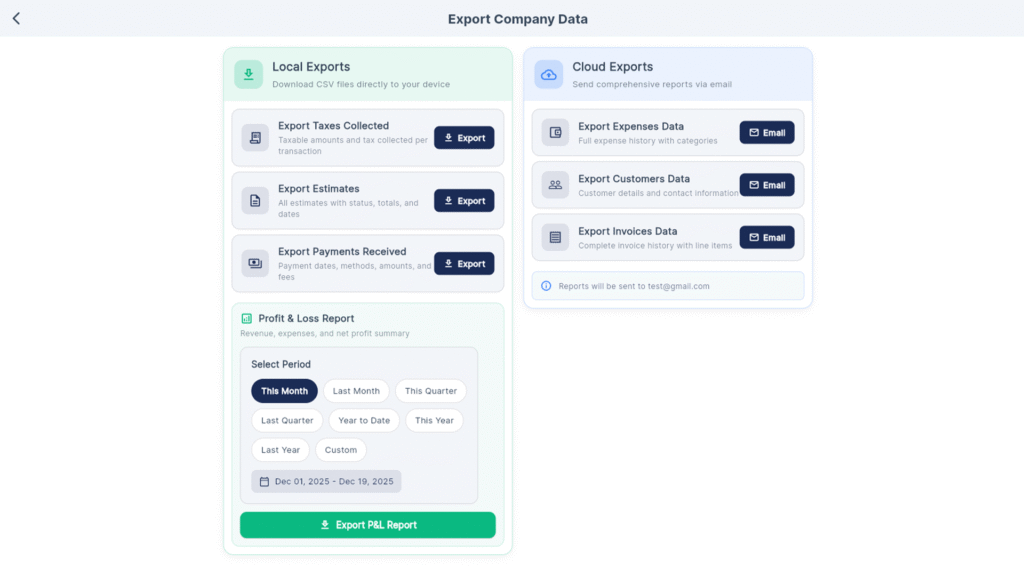
With tax season approaching, QuoteIQ expanded the export functionality significantly. Previously limited to contacts and a few other items, you can now export:
- Taxes Collected – Pull all collected taxes for tax filing
- Estimates – Export all estimates created
- Payments – Full payment history export
- Profit and Loss – P&L reports for your accountant
- Expenses – All logged business expenses
- Customers – Complete customer database
- Invoices – Full invoice history
Access all export options from Settings → Export Data. These exports make tax preparation faster and give you complete control over your business data.
December 2025 Update: Feature Summary
| Feature | What It Does | Availability |
|---|---|---|
| Quick Create Button | One-click access to estimates, invoices, contacts, and more | All Plans (Desktop) |
| CRM Section | Dedicated menu section for contact management | All Plans |
| Enhanced Contacts | Table view with full customer details visible | All Plans |
| Contact Quick Actions | Create estimates/invoices/events from contact screen | All Plans |
| PDF Attachments | Attach documents to customer profiles | All Plans |
| Company Name Search | Find commercial contacts by company name | All Plans |
| Tag Filtering | Filter contact list by assigned tags | All Plans |
| Bulk Contact Actions | Select multiple contacts for mass deletion | All Plans |
| Settings Search | Search bar in settings menu | All Plans |
| Drag-and-Drop Services | Reorder services on estimates and invoices | All Plans |
| AI Before/After Workflow | Generate and attach AI preview images | Pro & Elite |
| Calendar Export | Print/export schedules as PDF, CSV, or text | All Plans |
| MapMeasure Preferences | Saves preferred measurement units | All Plans |
| Review Multiplier Overhaul | Analytics, multi-platform links, mass blasts, AI calls | All Plans |
| Expanded Data Export | Export taxes, P&L, estimates, invoices, and more | All Plans |
Frequently Asked Questions
Do I need to pay extra for the December 2025 update features? No. All features in this update are included with your existing QuoteIQ subscription at no additional cost. The update applies automatically to all Beginner, Pro, Elite, and Max plans.
Is the Quick Create button available on mobile? The Quick Create button is currently available on desktop at myquoteiq.com. Mobile functionality may be added in future updates based on user feedback through Suggest a Feature.
Can I export my calendar schedule to give to employees? Yes. The new calendar export feature lets you select date range (today, this week, this month, or custom), choose specific employees, and export as PDF, CSV, or text. You can toggle pricing visibility on or off before exporting.
What types of files can I attach to customer contacts? Currently PDF attachments are supported. This covers contracts, signed agreements, inspection reports, insurance documentation, and any compliance paperwork you need stored with the customer record.
How does the AI review request calling work? The AI outbound calling feature uses QuoteIQ’s Virtual Call Team technology. You set up a campaign, and an AI agent calls your customers to request they leave a review for your business. The AI handles the entire conversation. This uses Virtual Call Team credits (included with Max plan or available as an add-on).
Can I reorder services on existing estimates, or only new ones? You can reorder services on any estimate—new or existing. Open the estimate, drag services into your preferred order, and save. The same applies to invoices.
Where did you get the ideas for these features? Every feature in this December 2025 update came from the Suggest a Feature tool in QuoteIQ. Users submit feature requests, vote on suggestions, and the QuoteIQ team prioritizes based on demand. Quick wins get shipped fast; larger features take longer but are still on the roadmap.
What data export options are available for tax season? You can export taxes collected, payments received, profit and loss reports, expense data, customer data, invoice data, and estimates. Access all exports from Settings → Export Data.
Key Takeaways
- Quick Create button saves clicks on every estimate, invoice, and contact you create
- Calendar export lets you print or share daily/weekly/monthly schedules with your crew
- Enhanced contacts screen shows full customer details without opening profiles—plus PDF attachments
- Review Multiplier now includes analytics, multi-platform links, mass blasts, and AI phone calls—all included free
- Drag-and-drop reordering for estimates and invoices gives you complete control over service presentation
- Expanded data export makes tax season easier with P&L, taxes collected, and payment exports
- All 14 features came from user suggestions through Suggest a Feature—QuoteIQ builds what users actually want
Start Using the December 2025 Update Today
If you’re already a QuoteIQ user, these features are live now. Log in at myquoteiq.com and start exploring the Quick Create button, enhanced contacts, and Review Multiplier improvements.
Not using QuoteIQ yet? Try it free for 14 days with full access to every feature—including everything in this December 2025 update. No credit card required to start.
Have a feature idea? Use the Suggest a Feature tool in QuoteIQ’s bottom left corner. Your idea could be in the next update.
INTERNAL LINKS TO ADD:
- “14-day free trial” → https://admin-quoteiq.web.app/register
- “Review Multiplier” → https://myquoteiq.com/features/review-multiplier/
- “MapMeasure Pro” → https://myquoteiq.com/features/mapmeasure-pro/
- “Virtual Call Team” → https://myquoteiq.com/features/virtual-call-team/
- “QuoteIQ Pricing” → https://myquoteiq.com/pricing/





