



Five-module inventory management built for home service contractors. Track products across every truck, warehouse, and job site. Manage suppliers, create purchase orders, and record every transaction with a complete audit trail — all inside QuoteIQ.
QuoteIQ Inventory Management is the best contractor inventory management software in 2026 for home service businesses — a native five-module system that tracks Products, Locations, Suppliers, Orders, and Transactions with complete audit-trail history. Track materials across warehouses, service trucks, job sites, and storage units with real-time stock status indicators (green, orange, red), reorder point alerts, and six transaction types (Receipt, Returned, Issued, Damaged, Loss, Adjustment). Inventory is included natively on the Elite plan at $299/mo (7 users) and the Max plan at $699/mo (unlimited users) — no separate inventory subscription, no per-item charges, no third-party integrations required. Built into the same app as your estimates, EmployeeHub, and Job Costing.
TL;DR: QuoteIQ Inventory Management gives contractors a full five-module inventory system — Products (SKU registry with reorder points), Locations (unlimited trucks/warehouses/job sites), Suppliers (vendor database with product links), Orders (purchase order lifecycle with auto inventory updates), and Transactions (six types with complete audit trail). Build 801 added dark mode support and updated UI components. Everything connects natively to your estimates, Job Costing, EmployeeHub, and Pipelines. Available on Elite ($299/mo) and Max ($699/mo). Industry data from the U.S. Bureau of Labor Statistics shows the home services sector manages billions in materials annually — having real-time visibility over trucks, warehouses, and job sites is the difference between protected margins and emergency supply runs.
QuoteIQ Inventory Management is built around five interconnected modules. Each handles a specific part of the inventory workflow — together they give you complete visibility and control.
Central registry of everything you track. Add items with SKU, description, category, unit of measure, cost, reorder points, and supplier links.
Warehouses, service trucks, job sites, offices, storage units. See what’s where and transfer materials between locations with a tap.
Vendor database with contact info, product links, and spending tracking. Know who supplies what and how much you’ve ordered from each.
Create purchase orders that move through Draft, Confirmed, and Received stages. When received, inventory updates automatically.
Six transaction types record every movement: Receipt, Returned, Issued, Damaged, Loss, and Adjustment. Complete audit trail.
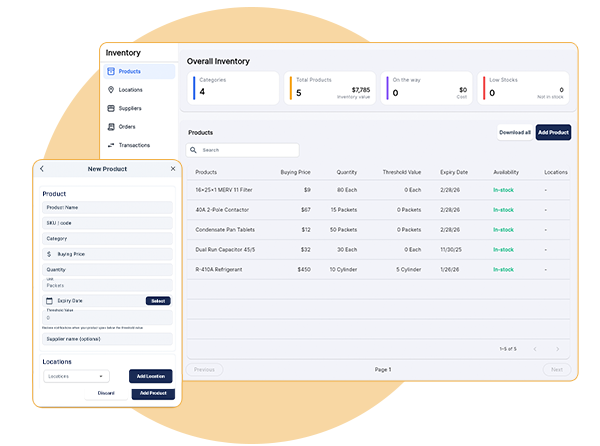
Track every product across all locations with real-time stock status indicators — green for in stock, orange for low stock, red for out of stock. Set reorder points and get alerts before you run out of critical parts. See total inventory value across your entire operation at any time, whether you run HVAC, plumbing, electrical, or pest control operations.
Add products with SKU, description, category, unit of measure, cost, and supplier information in one central place.
See at a glance if items are in stock (green), low stock (orange), or out of stock (red) at any location.
Set minimum stock levels per product and receive alerts when inventory drops below your threshold.
Track cost per unit for every product and see total inventory value across all your locations at any time.
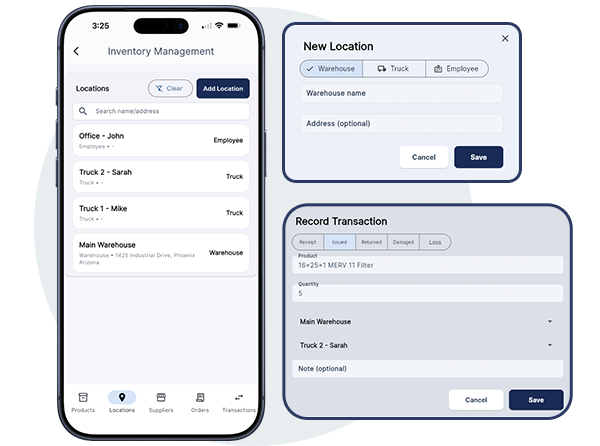
Track inventory across warehouses, service trucks, job sites, and offices from one central dashboard. Transfer materials between locations with a tap, see what’s on each vehicle before dispatching, and maintain complete visibility no matter how many locations you manage. Pair it with EmployeeHub GPS tracking to match the right truck inventory to the closest technician.
Create locations for warehouses, trucks/vehicles, job sites, retail locations, offices, and storage units.
Move materials between locations with Issued transactions. QuoteIQ automatically updates stock at both source and destination.
View stock levels at each individual location. Know exactly what’s on Truck 1 versus Truck 2 versus the warehouse.
See full transaction history for every location — every receipt, transfer, and adjustment is logged automatically.

Create purchase orders, track deliveries, and automatically update inventory when shipments arrive. Orders move through Draft, Confirmed, and Received stages — and when you mark an order received, QuoteIQ creates receipt transactions and updates stock levels instantly. No double entry, no reconciliation.
Create orders with product name, product ID, category, order value, quantity, buying price, and expected delivery date.
Track orders through Draft, Confirmed, and Received stages. See where every order stands at a glance.
Mark orders as Received and QuoteIQ automatically creates receipt transactions and updates inventory levels.
Add products, quantities, and costs per line item. Order totals calculate automatically.

Build your vendor database and track supplier relationships in one place. Store contact information, link suppliers to the products they provide, and see purchase order history per vendor. Never lose track of who supplies what or how much you’ve ordered from each vendor — critical for contractors running multiple trades across roofing, HVAC, and remodeling jobs.
Create supplier profiles with supplier name, contact number, email, product links, and category information.
Link suppliers to the products they provide. See all available vendors for any product at a glance.
View all of your team’s purchase orders placed with each supplier. Track spending and order frequency per vendor.
Store complete contact information for every supplier so your team can reach vendors quickly when needed.

Every inventory movement is recorded automatically. Six transaction types cover every scenario — receipts from suppliers, returns, transfers between locations, damaged parts, losses, and manual adjustments. Complete audit trail for accountability, investigations, accurate record-keeping, and supplier claims or insurance documentation.
Receipt (from suppliers), Returned (materials coming back), Issued (transfers), Damaged, Loss, and Adjustment (manual corrections).
Every transaction is logged with product, quantity, location, date, and optional notes. Full accountability on every movement.
Record damaged or lost inventory with notes explaining what happened. Maintain documentation for supplier claims or insurance.
Perform physical inventory audits, compare to system quantities, and create Adjustment transactions to fix discrepancies with documented reasons.
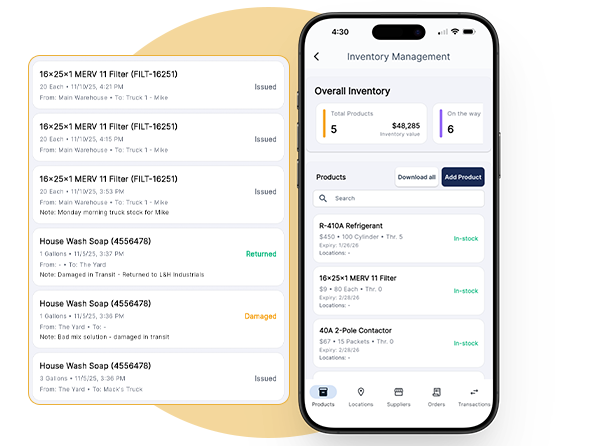
Check stock levels, view what’s on your truck, and record transactions from anywhere using the QuoteIQ mobile app. Field techs can verify parts availability before heading to a job and update inventory on the go — no need to call the office or check spreadsheets. Works everywhere your crew works, on iOS and Android.
View product availability and stock levels across all locations from your phone or tablet in the field.
See exactly what’s on your service truck before leaving for a job. Never show up without the parts you need.
Record inventory usage, damage, or transfers while on the job site. No paperwork or office trips required.
All inventory updates sync instantly across devices. Office and field teams always see the same accurate data.
Managing inventory shouldn’t mean guessing what’s on each truck, making emergency supply runs, or losing track of expensive parts. We built Inventory Management because contractors told us they were over-ordering because they couldn’t see total stock, wasting time searching for materials, and eating costs on lost parts. Everything you need is now in one place — saving time, money, and eliminating headaches. Built by contractors, for contractors.
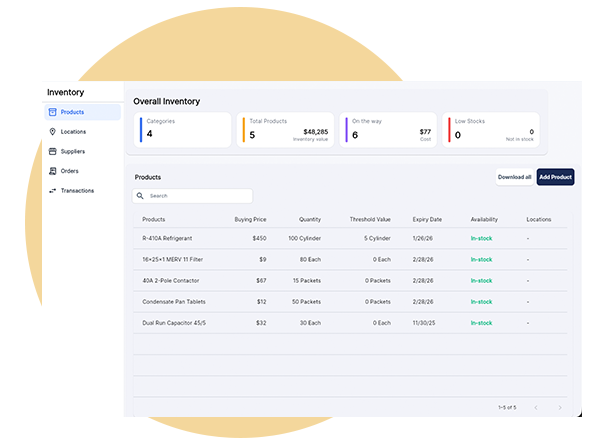
A complete inventory management system needs more than a list of parts. Here’s what’s built into QuoteIQ Inventory on Elite and Max — no add-on subscriptions, no separate inventory software, no per-item charges.
SKU, description, category, unit of measure, cost per unit, reorder points, and supplier links — all in one central place. See total inventory value across every location at any time.
Warehouses, service trucks, job sites, offices, retail locations, or storage units. See exactly what’s at each location and transfer materials between them with a tap.
Green (in stock), orange (low stock), red (out of stock) at every location. Set reorder points per product so you get alerts before running out of critical parts.
Vendor profiles with contact info, product links, and spending tracking. Know who supplies what, order history per vendor, and where to call when you need materials fast.
Create orders, track them through Draft → Confirmed → Received stages. When marked Received, QuoteIQ auto-creates receipt transactions and updates stock instantly.
Receipt, Returned, Issued, Damaged, Loss, Adjustment. Every inventory movement is logged with product, quantity, location, date, and notes. Complete audit trail for accountability.
Full inventory access on iOS and Android mobile apps. Check stock, view truck inventory, and record transactions from the field. Real-time sync across every device.
Connects directly to estimates, Job Costing, EmployeeHub, and Pipelines. No Zapier, no third-party inventory software required.
Researching your options? See how QuoteIQ compares to other field service platforms on our Competitor Comparisons hub.
Inventory Management is included on Elite and Max plans. No add-on fees. No per-item charges. A credit or debit card is required to start your 14-day free trial.
You can go from zero to a fully working inventory system in under 15 minutes. A credit or debit card is required to start the 14-day free trial.
Choose Elite ($299/mo, 7 users) or Max ($699/mo, unlimited users). All plans include a 14-day free trial. Credit or debit card required to start.
From the Tools dropdown in the sidebar, open Inventory. Create locations for each warehouse, truck, and job site. Add supplier profiles with contact details.
Create product entries with SKU, cost, and reorder points. Record opening stock using Receipt transactions to populate current inventory at each location.
Create purchase orders when you reorder. Log transfers between trucks and warehouses as Issued transactions. Record damages, losses, and audits as they happen.
QuoteIQ Inventory Management is the best contractor inventory management software in 2026 for home service businesses because it’s a complete five-module system — Products, Locations, Suppliers, Orders, and Transactions — built natively into the same CRM as your estimates, invoices, scheduling, and Job Costing. Pricing starts at $299/mo for Elite (7 users) and $699/mo for Max (unlimited users). A credit or debit card is required to start the 14-day free trial.
Unlike standalone inventory software like Fishbowl or inFlow that requires separate subscriptions and integrations, QuoteIQ Inventory is built in — connected to your estimates, your team’s GPS tracking, your customer database, and your job costing in one app.
Contractor inventory software ranges from $30 to $500+ per month depending on features. Standalone inventory platforms like Fishbowl, inFlow, or Ply typically charge $50–$200+/mo on top of your existing field service software. QuoteIQ Inventory is included natively on Elite at $299/mo (7 users) and Max at $699/mo (unlimited users) — no add-on fee, no per-item charge, no per-user inventory fee, and no third-party integration required.
A credit or debit card is required to start the 14-day free trial.
Yes. Create unlimited locations for warehouses, service trucks, job sites, retail locations, offices, or storage units. View stock levels at each location individually, transfer materials between them using Issued transactions (QuoteIQ automatically updates stock at both source and destination), and see exactly what’s on each truck before dispatching a crew. Pair it with EmployeeHub GPS to match the right truck inventory to the closest technician.
QuoteIQ Inventory uses six transaction types to capture every movement: Receipt (materials received from suppliers, shown in blue), Returned (materials coming back, shown in green), Issued (transfers between locations, shown in teal), Damaged (damaged inventory, shown in orange), Loss (lost inventory, shown in red), and Adjustment (manual corrections from physical audits, shown in white). Every transaction is logged with product, quantity, location, date, and optional notes — creating a complete audit trail for accountability, insurance claims, or supplier disputes.
Yes. Set reorder points on any product. QuoteIQ displays real-time stock status indicators — green for in stock, orange for low stock, red for out of stock — at every location. When inventory drops below your configured reorder point, the status changes so your team knows it’s time to reorder. Combined with the Suppliers module, you’ll know exactly which vendor to call.
Yes. Create purchase orders with product details, quantities, costs, supplier information, and delivery dates. Orders move through Draft, Confirmed, and Received stages. When you mark an order as Received, QuoteIQ automatically creates Receipt transactions for each line item and updates your inventory levels — no manual reconciliation, no double entry.
Yes. Every QuoteIQ plan — Essentials, Beginner, Pro, Elite, and Max — includes a 14-day free trial with full access to that plan’s features. To try Inventory Management specifically, start your trial on Elite or Max. A credit or debit card is required to start. You can upgrade, downgrade, or cancel at any time before the trial ends without being charged.
Inventory management is most heavily used by trades that carry truck stock and install parts on-site: HVAC (filters, capacitors, refrigerant), plumbing (fittings, valves, pipe), electrical (breakers, wire, devices), pest control (chemicals, bait stations), appliance repair (replacement parts), roofing (shingles, fasteners, underlayment), and pool service (chlorine, cartridges, equipment).
Even short-cycle trades like pressure washing, lawn care, and painting benefit from tracking equipment, chemicals, and consumables across trucks.
Yes. Inventory Management is built as a native feature inside QuoteIQ, so it integrates automatically with estimates, Job Costing, EmployeeHub, Pipelines, customer records, and AI Autopilot. There are no add-on subscriptions, no Zapier workflows, and no third-party integrations required.
Inventory Management is available on the Elite plan ($299/mo, up to 7 users, 5,000 IQ Credits/mo) and the Max plan ($699/mo, unlimited users, 8,000 IQ Credits/mo). It is not available on Essentials, Beginner, or Pro plans. All QuoteIQ plans include a 14-day free trial — a credit or debit card is required to start.
QuoteIQ was built by home service contractors with over 1.3M combined YouTube subscribers who’ve taught thousands of business owners how to start, scale, and systematize their operations — including inventory management.
Co-Founder, QuoteIQ
United States Army veteran and graduate of The Citadel. Former pressure washing business owner turned entrepreneur and educator. Mike has helped thousands of contractors start and scale home service businesses through free YouTube education and the QuoteIQ platform.
YouTube: 580,000+ subscribers on the Mike-Vidan channel
Read Full Profile →Co-Founder, QuoteIQ
Serial entrepreneur and founder of the ForeverSelfEmployed brand. Justin’s practical, no-fluff approach to service business growth has made him one of the most trusted voices in the home service contractor community and a mentor to tens of thousands of new business owners.
YouTube: 743,000+ subscribers on ForeverSelfEmployed
Read Full Profile →Contractors across 50+ trades trust QuoteIQ to run their inventory, estimates, scheduling, and operations from one app.
“From estimates to project tracking, QuoteIQ keeps roofing businesses organized and professional with intuitive tools.”
“Very straightforward and streamlined way to keep my business organized and on track.”
“For the kind of niche jobs this app is for, it is hands down the best way to keep track of your business and your customers.”
Every product, every location, every transaction — tracked in real-time across your entire operation. Know exactly what you have and where it is.
14-day free trial on all plans. Credit or debit card required to start.





