Published February 2026 · Updated September 2026
Automated follow-up emails and texts triggered by real customer events — estimate created, estimate scheduled, estimate declined, or invoice paid. Set it once and QuoteIQ does the follow-up forever. Included on Pro at $149.99/mo with 4 users and 3,000 IQ Credits, and on Elite and Max above it.
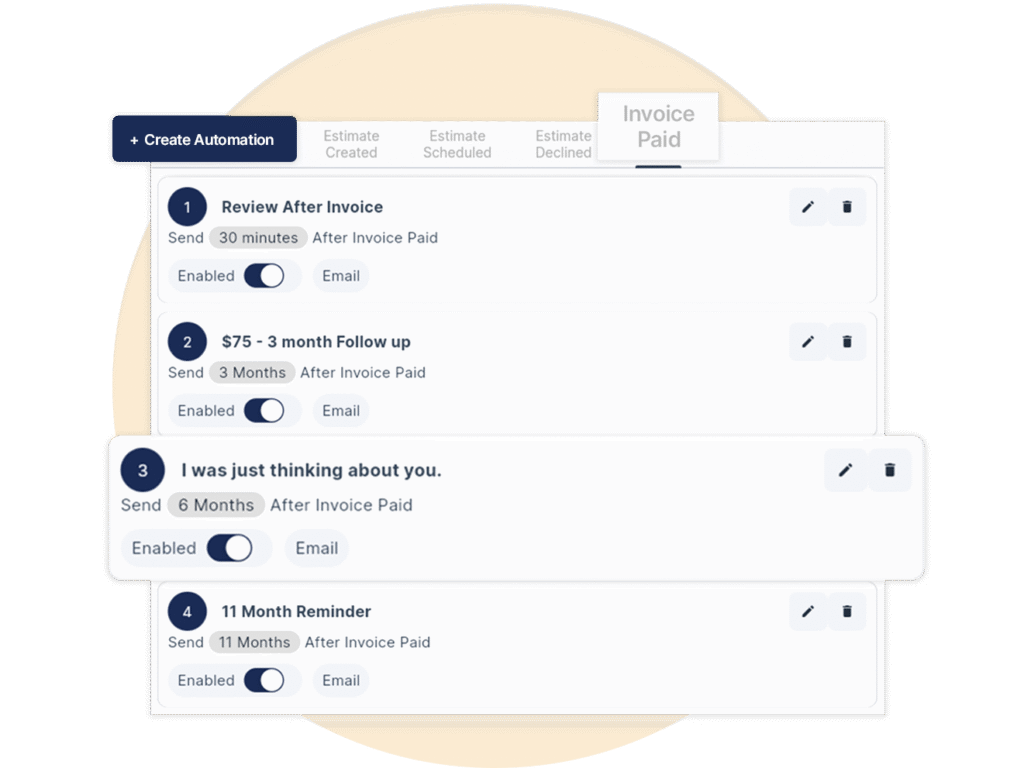
QuoteIQ’s Automation Campaigns are built for home service contractors rather than general marketers. Follow-ups fire on four real job events — Estimate Created, Estimate Scheduled, Estimate Declined and Invoice Paid — and each step can go out as an email or a text, personalized by 13 merge tags that pull the customer’s name, service list, estimate total, appointment date and payment details straight from the job record. Seven send windows run from immediately through 30 minutes, 1 day, 3 months, 6 months, 12 months and 24 months after the trigger, so one sequence can cover the approval chase, the appointment reminder, the review request and the seasonal re-book. The feature is included on Pro at $149.99/mo — no add-on fee, no per-message charge from QuoteIQ — alongside ClientHub, Job Costing and the Client Portal.
TL;DR: QuoteIQ automates contractor follow-up on four job events with 13 merge tags and seven send windows from 30 minutes to 24 months, included on Pro at $149.99/mo for 4 users. Sequences pair with ClientHub‘s dedicated business number, invoicing, scheduling, Review Multiplier, the Client Portal and analytics, while Mass Campaigns handle one-off promotional blasts on Elite and Max. Commercial email must still follow the FTC’s CAN-SPAM rules, and marketing texts fall under the FCC’s TCPA consent requirements.
Choose a trigger event, write the message, set the timing, turn it on. QuoteIQ sends the right message at the right moment without anyone remembering to do it.
Four events fire automations: Estimate Created, Estimate Scheduled, Estimate Declined and Invoice Paid. Each one maps to a moment that already happens inside your estimates and invoices.
Build an email in the rich text editor or a short SMS, then drop in merge tags for the customer’s name, service list, total or appointment date. The AI Text Generator drafts the wording if you would rather not start from a blank box.
Send immediately, after 30 minutes, after 1 day, or 3, 6, 12 or 24 months out. Chain several steps under one trigger so the approval chase, the thank-you and the seasonal re-book all come from a single sequence.
Flip the automation live and it runs forever. The Queue tab shows what is scheduled, History shows what went out, and failed items can be dismissed without touching the rest of the sequence.
4 trigger events × 7 send windows × 13 personalization tags. A single Invoice Paid sequence can carry a 30-minute review request, a 3-month check-in, a 6-month upsell and a 12-month seasonal reminder — four touches from one setup, repeated on every customer who pays an invoice for as long as the automation stays on.
Set it once and let it run. Automation Campaigns send targeted emails and texts based on real customer events, and you choose the spacing — minutes, days or months after the quote or the job. A nudge to approve an estimate, a check-in after a completed job, a seasonal upsell half a year later: all of it comes out of one sequence attached to one trigger. Every step can be toggled on or off independently, so you can retire a message without rebuilding the campaign around it. Because the sequence reads from the job record, the customer who books through InstaSchedule and the customer you quoted from the truck both land in the same follow-up track.
Pair sequences with reminders and tasks for the handful of jobs that genuinely need a human call, and let the automation carry everything else.
Nobody opens a message that reads like a mail merge. Every automated email or text can carry merge tags that pull live data off the record — the customer’s first name, the company name, the service list, the estimate total, the scheduled date, the invoice link. That turns one template into a message that reads as if you typed it for that customer this morning. A template variable picker inserts the fields without anyone memorizing tag syntax, and available tags change with the trigger: @schedule_date exists on Estimate Scheduled, @paid_at on Invoice Paid. The same discipline that makes Options estimates convert applies here: specific beats generic.
Those links matter more than the copy around them: @invoice_link drops the customer straight into online payment, where card, ACH, Apple Pay and Google Pay are all available — and consumer financing through Affirm, Klarna and Afterpay sits on every plan for the larger tickets.

Once campaigns are live they run behind the scenes, but you are never guessing about them. The Automations dashboard splits into Templates, Queue and History: Templates is what you have built, Queue is what is scheduled to go out, History is what already went. Queue items can be searched by customer and filtered by status, and anything that failed can be dismissed straight from the list instead of leaving a dead entry in the pipeline forever. View Logs on an individual step shows exactly what was sent, when, and to whom. That is the difference between an automation you trust and one you quietly stop relying on — and it feeds the same reporting discipline as business analytics and job costing.
Everything a customer receives is also written back to their record in the client database, so whoever picks up the phone next already knows what was sent.

The two things contractors reported about automation software everywhere — messages that fired late and messages that fired twice — were the exact problems the Spring 2026 rebuild set out to kill.
V2 automations run on their own queue pipeline rather than sharing general app processing, which is what makes a 12-month reminder land on the right day instead of whenever the system next got around to it — and what stops a single customer receiving the same message twice.
Email sequences can be grouped, searched and filtered. Once a shop is running separate tracks for separate services, template sprawl is the real failure mode, and being able to find the right one in two seconds is what keeps the library maintained.
Describe the automation you want in plain language and it gets built for you — the same conversational approach behind AI Autopilot, which controls the wider CRM through 55 integrated tools across 13 categories.
An automation that fires 80% of the time is worse than no automation, because you stop checking and the 20% is invisible. Draft-stage estimates do not trigger Estimate Created sequences — publishing the estimate is what fires them — so a quote you are still building never pushes a half-finished message to a customer.
Each trigger carries its own merge tags, so the data available to the message always matches the moment it fires.
Fires when a new estimate is published. Remind the customer to review and approve the quote before it goes cold — the highest-leverage automated message most contractors are not sending.
Fires when the job lands on the calendar. Confirmations, day-before reminders and arrival messages go out without anyone opening the schedule to check.
Fires on a declined quote — the trigger almost nobody uses. A gracious note now and a seasonal offer three months later turns a dead file into a live lead.
Fires on payment. Thank-you notes, review links and seasonal upsells land while the work is still fresh, turning one-time jobs into repeat customers.
The four triggers are the same everywhere. What changes is the cadence — how long until the same customer needs you again. These are the sequences that fit each trade’s natural re-buy cycle.
House washing and driveway work sit on a rough 12-month cycle, and that is exactly what the 12-month send window exists for. Run Estimate Created with a 1-day approval nudge, Invoice Paid with a 30-minute review request, and a 12-month “your house is due again” message carrying @service_list so the customer sees precisely what you cleaned last time. Price the re-quote against the same numbers with the pressure washing cost calculator, and keep the before-and-after set from QuoteIQ Cam attached to the record. Full build-out on the pressure washing software page.
Recurring mowing lives in invoice subscriptions, so automations should carry the things subscriptions do not: the spring wake-up offer at 6 months, the fall cleanup at 12, aeration and overseeding quotes to customers who only ever bought mowing. Estimate Declined plus a 3-month follow-up is the single highest-yield sequence in this trade, because a no in March is frequently a yes in June. Size the work with the lawn care cost calculator, invoice from the landscaping invoice template, and see the whole stack on the lawn care and landscaping pages.
Two maintenance seasons a year means two automated windows: 6 months and 12 months from Invoice Paid, one for cooling and one for heating. The Estimate Created nudge earns its keep on replacement quotes, where homeowners take days to decide and the quote that gets followed up is the one that gets signed. Keep equipment photos and inspection results in inspection forms, quote against the HVAC cost calculator, bill from the HVAC invoice template, and start from the HVAC software page.
Roofing has the longest re-buy cycle of any trade here, so the value is not the repeat sale — it is the referral and the inspection. Invoice Paid plus a 30-minute review request captures the moment the homeowner is happiest, and a 24-month check-in message keeps you in front of a customer whose neighbors are now shopping. Measure remotely with MapMeasure Pro, which reads roof dimensions and pitch off aerial imagery, and build from the roofing software page.
Painting quotes are large, considered and slow, which makes the Estimate Created sequence the whole ballgame: an immediate send with @estimate_link, a 1-day follow-up, and a 3-month message on anything declined. Interior work in winter and exterior in summer means a 6-month upsell lands naturally. Quote with the painting cost calculator, present tiers through package estimates, invoice from the painting invoice template, and see the painting software page.
Quarterly service is the model, so the 3-month window is doing most of the work — a treatment reminder that goes out on its own and books itself through the Client Portal. Add a 12-month termite or rodent inspection prompt for customers who only ever bought general pest. Price it with the pest control cost calculator and start from the pest control software page.
High-frequency, low-ticket work lives or dies on reliability messaging: the appointment confirmation, the day-before reminder, the arrival text. Estimate Scheduled carries all three, and ClientHub‘s dedicated business number keeps them off personal phones. Quote with the house cleaning cost calculator, bill from the house cleaning invoice template, and see the house cleaning and window cleaning pages.
Seasonal trades are the clearest case for long send windows, because the customer genuinely does not need you until the calendar says so. Gutter cleaning at 6 and 12 months, holiday lighting at 11 months, snow removal contracts in early fall, tree work on a 24-month canopy cycle. Quote from the tree removal, gutter cleaning and holiday lighting calculators, and see the tree care, gutter cleaning, holiday lighting and snow removal pages.
Demand trades get found in an emergency and forgotten afterwards, which is what the 6- and 12-month windows fix: a short message that reminds the customer they already have a plumber. Estimate Created follow-up matters on panel upgrades, repipes and anything where the homeowner is collecting three bids. Bill from the electrical, handyman and contractor invoice templates, and start from the plumbing, electrician and handyman pages.
Pool service runs on openings and closings, which is a clean 6-month pair. Concrete, decks and fencing are one-off jobs with a sealing or maintenance tail — a 12-month reseal message on a driveway is close to free revenue. Price with the concrete, deck and fence calculators, or browse every one of them in the home service business calculators hub. Trade pages: pool service and concrete contractor, with the rest under all industries.
The U.S. Bureau of Labor Statistics projects about 587,000 openings a year in construction and extraction occupations, against a median annual wage of $59,540 as of May 2025. Every hour an owner or an office manager spends retyping the same follow-up is an hour priced at that rate or higher — which is the entire argument for automating the message and keeping the person on the work.
Automation does not change who is responsible for the send. Two federal frameworks cover almost everything a home service business does.
The FTC’s CAN-SPAM compliance guide sets eight requirements for commercial email: accurate header and routing information, a subject line that matches the content, clear identification of advertising, a valid physical postal address, and a working opt-out mechanism. Opt-out requests must be honored within 10 business days, and the opt-out mechanism has to keep working for at least 30 days after the message went out. Penalties run to $53,088 per violating email, and hiring someone else to send does not transfer the liability. Your sequences should carry your real business address and a genuine unsubscribe path — and when someone opts out, the follow-up track stops for that customer.
Text messaging is governed by the Telephone Consumer Protection Act, and the FCC’s telemarketing rules require prior express written consent before marketing robocalls or texts, alongside the national Do-Not-Call registry. The practical line for contractors: transactional messages tied to a job the customer booked — appointment confirmations, on-the-way notices, invoice links — sit in different territory from promotional blasts sent to a list. The FTC’s Telemarketing Sales Rule guidance covers the disclosure and recordkeeping side. Collect consent where you collect the phone number, keep the record, and honor every stop request immediately.
Automations that fire off job events — estimate sent, appointment booked, invoice paid — are the safest category to run aggressively, because the customer initiated the relationship. Promotional sends to a whole segment carry more obligation, which is one more reason they live in Mass Campaigns as a separate, deliberate tool rather than inside the automatic track. The SBA’s guidance on managing a business is a reasonable starting point on the marketing and compliance basics, and none of this is legal advice.
Two different tools on two different plans. Confusing them is the most common setup mistake.
| Automation Campaigns | Mass Campaigns | |
|---|---|---|
| What sets it off | A job event — estimate created, scheduled, declined, or invoice paid | You, manually, when you decide to send |
| Who receives it | The one customer the event belongs to | A whole list or a Tag-filtered segment |
| Plan | Pro ($149.99/mo), Elite ($299/mo), Max ($699/mo) | Elite ($299/mo) and Max ($699/mo) |
| Channels | Email and SMS, per step | SMS and email blasts, MMS supported |
| Setup required | None beyond writing the sequence | Your own gateways — Twilio for SMS with A2P 10DLC registration, SendGrid for email with a verified sender |
| Best used for | Approval chasing, reminders, review requests, seasonal re-books | Promotions, holiday specials, service announcements |
| Runs without you | Yes — forever, once live | No — every send is a decision |
Mass Campaigns are not free-unlimited messaging. Contractors connect their own Twilio account for SMS — Account SID, auth token, number and A2P 10DLC registration, with carrier fees on your account — and their own SendGrid key with a verified sender for email. Automation Campaigns on Pro do not carry that setup burden, which is a genuine reason to start there rather than jumping to Elite for blasts you may not send.
Automations are one layer. These are the features they lean on, all inside the same CRM rather than bolted together with integrations.
A rich text editor with formatting, links and merge tags. Write the template once and every recipient gets a version built from their own record — no exports, no list uploads, no second system.
Any step in a sequence can be a text instead of an email. Short reminders and arrival notices cut through where inbox messages sit unread, and ClientHub keeps replies in one thread on the customer record.
Two mechanics: an instant redirect to your review page after payment, and an email or SMS review-request automation with four event triggers. Destinations include Google Business Profile, Facebook, Yelp and Angi. Review Multiplier has its own page.
Tell customers you are en route from your business number, not a personal cell. Included on Pro alongside automations, and a measurable dent in no-shows and “where are you?” calls for every high-frequency trade.
Promotional campaigns to your whole list or a Tag-filtered segment — seasonal offers, holiday specials, service announcements. Available on Elite and Max. See Mass Campaigns.
One-click import of Mike Vidan’s proven sequence, running from the first estimate follow-up through 11-month reminders. Written by a contractor who ran these campaigns in his own business before they shipped to anyone else.
Every @estimate_link and @invoice_link lands somewhere. The Client Portal gives customers estimates to approve, invoices to pay, appointments, requests and a review prompt — with no app download and no account to create.
The inbound half of the same problem. The Virtual Call Team answers 24/7, qualifies leads, filters spam and transcribes every call, metered at 125 IQ Credits per minute so you only pay for calls it actually takes.
Website enquiries arrive through contact request forms and move through Pipelines and Deals on Elite and above, where close probability weights the forecast instead of flattering it.
Email and text automation arrives with the Pro plan and stays included on every tier above it. Annual billing is ten months’ cost for twelve.
| Plan | Monthly | Annual | Users | IQ Credits | Automation Campaigns |
|---|---|---|---|---|---|
| Essentials | $29.99 | $299.99 | 1 | 500 | Not included |
| Beginner | $74.99 | $749.99 | 2 | 1,500 | Not included |
| Pro | $149.99 | $1,499.99 | 4 | 3,000 | Included — with ClientHub, Client Portal, Job Costing and QuickBooks Online |
| Elite | $299 | $2,990 | 10 | 5,000 | Included — plus Mass Campaigns, InstaQuote, InstaSchedule, Pipelines, Inventory, Route Optimization, EmployeeHub |
| Max | $699 | $6,990 | Unlimited | 8,000 | Included — plus Sales Team Tracker, Crews, AI Website Builder and 4 additional businesses |
Pro at $149.99/mo covers 4 users and 3,000 IQ Credits a month, and QuoteIQ charges no per-message fee for automations on top of it. Compare that against what the same shop would spend on a separate marketing tool plus a separate CRM — and see the full ladder on the pricing page or the side-by-sides in the comparison hub.
Automations are only as good as the list behind them, so the first job when switching is getting every customer record across intact. AI Smart Import takes a CSV exported from Jobber, Housecall Pro, ServiceTitan or any other CRM and maps the columns automatically, and contacts can come straight off your phone as well. For a current read on what any of those platforms charge, check their own pricing pages — figures move, and a stale number in a comparison is worse than no number.
Once the list is in, the sequence matters more than the size of it. Most shops get further by turning on two automations properly than by building nine and trusting none of them. Start with Estimate Created and Invoice Paid, watch the History tab for a fortnight, then add the declined-quote track and the long seasonal windows. Roles and access are handled through roles and permissions, so an office manager can own the templates without touching billing, and everything exports again through data export if you ever want it elsewhere. The platform runs the same on iOS, Android and the web, so the automation you build at the kitchen table is live on the truck.
Trigger, timing and what the message actually needs to say. Build these five and you have covered the places money leaks out of a home service business.
Two steps. An email that fires immediately carrying @service_list, @estimate_total and @estimate_link, so the quote is in their inbox before you have left the driveway. Then an SMS after 1 day that does one job only: ask whether they had a chance to look, and repeat the link. Resist the urge to re-sell in the second message — a quote that needs re-selling by text needed a better Options estimate in the first place, where Good/Better/Best tiers let the customer choose a number instead of choosing yes or no. If you are presenting bundled work, package estimates do the same job. Attach photos from QuoteIQ Cam and, on bigger tickets, make sure financing is visible before the follow-up lands.
Three steps, all short. An immediate confirmation with @schedule_date, a reminder the day before, and an arrival text on the morning itself. This is the sequence that removes the phone calls you currently take standing in someone’s yard. High-frequency trades feel it hardest — house cleaning, lawn care, pool service — where one crew might touch a dozen properties a day and every “are you coming today?” costs somebody five minutes. Keep all of it on the business number through ClientHub so replies land on the job record rather than a technician’s personal phone, and let customers reschedule themselves through InstaSchedule instead of playing phone tag with the office.
Two steps, and the second one is where the money is. Fire a short, genuinely gracious message immediately: thank them, leave the door open, do not ask why. Then a 3-month follow-up that does not mention the old quote at all — it offers the service again at the season it actually makes sense. A declined spring quote in landscaping is a live lead by June; a declined roof in roofing is a live lead after the next storm. Most contractors never build this sequence because losing feels final, but the file already contains a qualified prospect who knows your price and has your number. Track the recovered ones through Pipelines and Deals so you can see what the trigger is actually returning, and re-price the second offer with the business calculators.
One step, 30 minutes after payment, and timing is the entire trick. The customer has just paid for work they are happy with; that window closes fast, and a request sent a week later reaches someone who has stopped thinking about you. Keep the message to two sentences and one link. Pair it with Review Multiplier, which also runs an instant post-payment redirect to your review page and can send review requests off four event triggers, with destinations including Google Business Profile, Facebook, Yelp and Angi. Before-and-after images from the before and after photo editor give the customer something concrete to describe, and a shared gallery makes the review easier to write than to skip.
One step at 6, 12 or 24 months depending on your trade’s re-buy cycle, carrying @service_list so the message names exactly what you did last time. This is the sequence that compounds: build it once in year one and it is still producing booked work in year four, on customers you have already paid to acquire. Whether the window is 6 months for HVAC maintenance seasons, 12 for pressure washing, or 24 for tree care, the mechanic is identical. Check what it returns against revenue by service in business analytics, and watch the margin on the repeat work in job costing — returning customers usually cost less to serve, and that is the number that justifies the whole system.
Five sequences, roughly nine messages, one afternoon of setup. After that the marginal cost of following up with customer number 400 is identical to customer number 4 — which is the structural reason automation beats discipline. The Census Bureau’s Statistics of U.S. Businesses shows just how much of the economy runs on firms small enough that the owner is also the person who would otherwise be sending these messages by hand.
QuoteIQ is built for home service contractors specifically, which is why its automation triggers are job events rather than marketing funnels. Follow-ups fire on Estimate Created, Estimate Scheduled, Estimate Declined and Invoice Paid, with 13 personalization tags and seven send windows running from 30 minutes to 24 months after the event. It is included on Pro at $149.99/mo for 4 users and 3,000 IQ Credits, rather than sold as a marketing add-on, and it sits in the same system as estimates, invoicing, scheduling and ClientHub, so the data the messages pull from is the data you already keep. More than 40,000 contractors use the platform, rated 4.7 across 4,103 app store reviews, and the automation engine runs on a dedicated queue pipeline so a message scheduled a year out actually fires on the day it is meant to. Whatever tool you choose, the send still has to satisfy the FTC’s CAN-SPAM requirements for commercial email.
QuoteIQ includes Automation Campaigns on Pro at $149.99/mo (4 users, 3,000 IQ Credits), Elite at $299/mo (10 users, 5,000 credits) and Max at $699/mo (unlimited users, 8,000 credits). Annual billing costs ten months for twelve — $1,499.99, $2,990 and $6,990 respectively. There is no separate automation add-on and no per-message charge from QuoteIQ for event-triggered sequences. The lower tiers, Essentials at $29.99 and Beginner at $74.99, do not include automations. Mass Campaigns are a different tool on Elite and above and do require your own Twilio and SendGrid accounts, with those providers’ fees on your account. For context on what an hour of your own labor is worth against the time this replaces, the Bureau of Labor Statistics puts the median construction and extraction wage at $59,540.
QuoteIQ supports four automation triggers, each tied to a real moment in the job. Estimate Created fires when a new quote is published — drafts do not trigger it, so an unfinished quote never pushes a message. Estimate Scheduled fires when the job lands on the calendar, which is where confirmations and day-before reminders belong. Estimate Declined fires when a customer turns a quote down, and is the trigger most contractors never set up despite it being the cheapest source of recovered revenue. Invoice Paid fires on payment, which is the right moment for thank-you notes, review requests through Review Multiplier, and seasonal upsells. Each trigger carries its own merge tags. The events originate in estimates and invoices you already create, and land back on the customer record. Consent for any marketing text still follows the FCC’s telemarketing rules.
Thirteen merge tags are available across the four triggers. The standard set covers @customer_first_name, @customer_last_name, @customer_name, @company_name, @service_list, @creation_date_time, @estimate_total and @estimate_link. Trigger-specific tags add @schedule_date on Estimate Scheduled, @declined_at on Estimate Declined, and @paid_at, @invoice_total and @invoice_link on Invoice Paid. A template variable picker inserts them without anyone typing tag syntax by hand. The links are the ones that do the work: @estimate_link takes the customer to a quote they can approve and e-sign through e-signatures, and @invoice_link opens online payment with card, ACH, Apple Pay and Google Pay, plus consumer financing on larger tickets. Both land in the Client Portal, and the AI Text Generator can draft the copy around them. Whatever the wording, a commercial email still needs the valid postal address the FTC requires.
Yes. Every step in a sequence is set independently as an email or an SMS, so a single trigger can mix both. A common pattern on Estimate Created is an email immediately with the full quote and @estimate_link, then an SMS one day later that simply asks whether they had a chance to look. Texts get read faster; emails carry detail and attachments. Both are personalized from the same merge tags, both are logged to the customer record, and replies to texts come back through ClientHub‘s dedicated business number rather than a personal phone — which matters once you have a team on team communication. Pair the SMS steps with scheduling reminders and on-the-way notices, and keep promotional sends in Mass Campaigns where they belong. Marketing texts require prior express written consent under the TCPA rules the FCC enforces.
Seven send windows are available: immediately, after 30 minutes, after 1 day, after 3 months, after 6 months, after 12 months and after 24 months from the trigger event. That spread is deliberate — it covers both ends of a contractor’s calendar. The short windows handle approval chasing and review requests, where minutes matter; the long ones handle re-buy cycles, which is where most home service revenue actually hides. A pressure washing shop uses 12 months, an HVAC company uses 6 and 12 for the two maintenance seasons, pest control lives on 3 months, and roofing gets more from 24-month referral touches than from any repeat sale. Sequences run on a dedicated queue pipeline so a 12-month message fires on the right day without duplicating, and the Queue tab shows everything pending. Price the return quote with the business calculators. Long-dated promotional sends still fall under the FTC’s Telemarketing Sales Rule where they apply.
Automation Campaigns are event-triggered and go to one customer: something happened on their job, so a message fires. Mass Campaigns are manual promotional sends to a whole list or a Tag-filtered segment, and nothing happens until you decide to push it. The plans differ too — automations are included from Pro at $149.99/mo, while Mass Campaigns require Elite at $299/mo or Max at $699/mo. So does the setup: blasts run on your own gateways, meaning a Twilio account with A2P 10DLC registration for SMS and a SendGrid key with a verified sender for email, with those carrier fees on you. Automations need none of that. Most shops should get the event-triggered sequences working first, using analytics to see what converted, before paying for broadcast reach. Bulk promotional email carries the full CAN-SPAM obligation set, including honoring opt-outs within 10 business days.
QuoteIQ offers a 14-day free trial with full access to the features of the plan you choose, one trial per person, business and payment method, a credit or debit card is required to start. Choosing Pro or above is what puts Automation Campaigns in the trial, alongside ClientHub, the Client Portal, Job Costing and QuickBooks Online sync. Two weeks is enough to prove the short windows but not the long ones, so the sensible test is to turn on Estimate Created and Invoice Paid on day one, run every real quote through them, and judge the tool on reply rates rather than on the interface. The trial converts to paid at your chosen plan’s rate unless you cancel before it expires, and it can be canceled at any point during those 14 days. General guidance on evaluating business tools is available from the U.S. Small Business Administration.
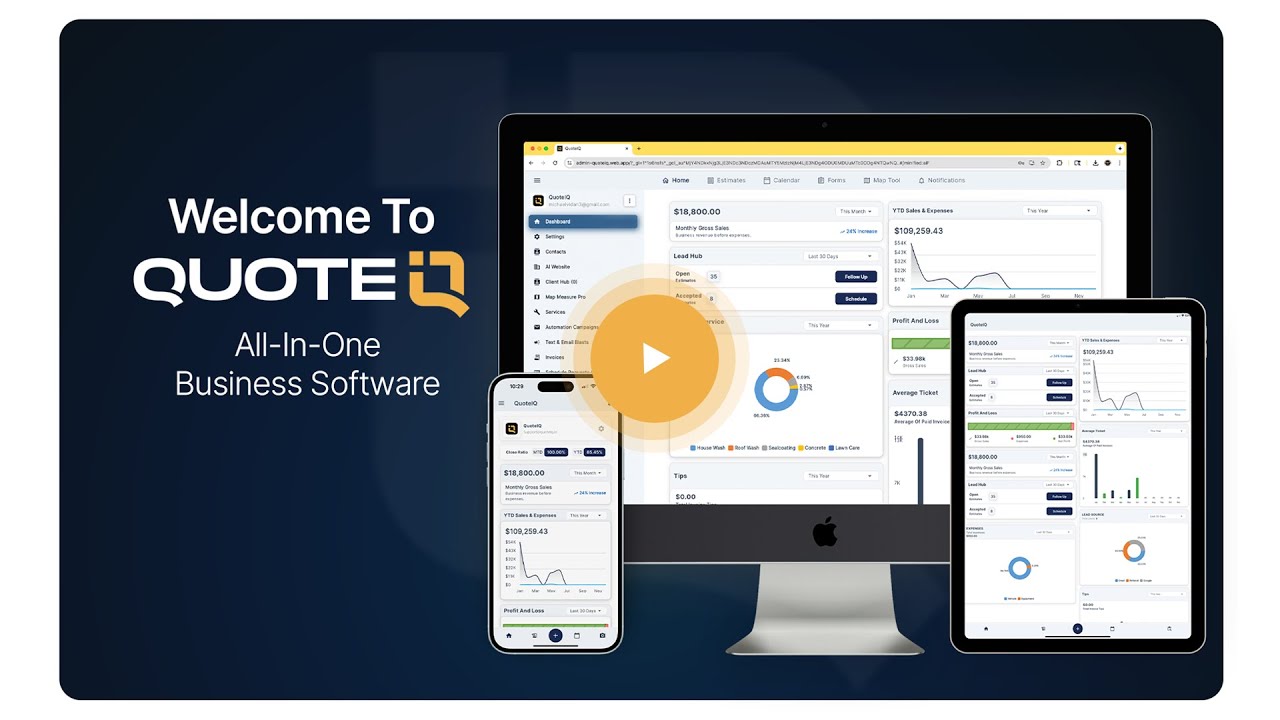
A walkthrough of the platform the automations live inside — estimates, scheduling, invoicing and follow-up in one system.
About fifteen minutes of setup, and it runs on every job after that.
Create the account and choose Pro or above, since that is the tier where Automation Campaigns live. A 14-day free trial gives full access to the features of the plan you choose.
Bring the list in through AI Smart Import — a CSV from your old CRM or contacts straight off your phone. The automations read from these records, so this step comes first.
Open Automations, pick Estimate Created, write an immediate email with @estimate_link and a 1-day SMS nudge. Then build Invoice Paid with a 30-minute review request. Two is enough to start.
Flip each sequence live, then check the Queue and History tabs after your next few jobs. Once you trust what you see, add the Estimate Declined track and the long seasonal windows.
Two working automations beat nine untested ones. The failure mode is never too little automation — it is a library of sequences nobody has opened in six months, quietly sending the wrong seasonal message. Review the Templates tab twice a year and retire what no longer matches the services you actually sell, which you can check against revenue by service.
Co-Founder, QuoteIQ
Mike ran a pressure washing business before he built software for one, and the pre-built automation sequence shipped in QuoteIQ is the one he used himself — first estimate follow-up through 11-month reminders. That history is why the triggers are job events rather than funnel stages: the product was designed around the moment a quote goes out and the moment an invoice gets paid, because those were the moments costing him money. Read more at his insights page.
Co-Founder, QuoteIQ
Justin co-founded QuoteIQ in Savannah, Georgia in September 2022 and drives the platform side — including the automation engine rebuild that moved sequences onto a dedicated queue pipeline so scheduled sends fire on time and never duplicate. Reliability work of that kind is invisible when it succeeds, which is exactly why it gets skipped elsewhere. More at his insights page.
“I was nervous switching systems, but QuoteIQ made the move seamless. Everything from customer details to quote follow-ups is now automated and stress-free.”
“Absolutely wonderful app for keeping track of your customers and sending out invoices. Even has options for automated quoting and emails! Can’t recommend enough!”
“From quote generation to follow-ups, this CRM simplifies my pest control workday. Organized, efficient, and makes me look super professional every time.”
Set it once. Approval nudges, appointment reminders, review requests and seasonal re-books — all running on their own, on every job, forever.

Tell Google that QuoteIQ is a source you trust. One tap unlocks up to 40% off your annual plan. No free trial — billed in full at checkout.